04 Custom Sender Event: Context-Aware Events
📋 Overview
In previous demos, events carried data but were anonymous. In complex games, context matters. This demo introduces Sender-Aware Events (GameEvent<TSender, TArgs>), allowing receivers to know WHO triggered the event, enabling context-sensitive logic like "Face the Attacker" or "Display Attacker Profile".
- How to create dual-generic events with sender information
- The difference between GameObject senders and pure C# class senders
- How receivers can use sender context for spatial and logical reactions
- When to use sender-aware events vs simple events
🎬 Demo Scene
Assets/TinyGiants/GameEventSystem/Demo/04_CustomSenderTypeEvent/04_CustomSenderTypeEvent.unity
Scene Composition
UI Layer (Canvas):
- 🎮 Three Attack Buttons - Located at the bottom of the screen
- "Raise (Turret Damage)" → Triggers
CustomSenderTypeEventRaiser.RaiseTurretDamage() - "Raise (Turret2 Damage)" → Triggers
CustomSenderTypeEventRaiser.RaiseTurret2Damage() - "Raise (System Damage)" → Triggers
CustomSenderTypeEventRaiser.RaiseSystemDamage()
- "Raise (Turret Damage)" → Triggers
Game Logic Layer (Demo Scripts):
-
📤 CustomSenderTypeEventRaiser - GameObject with the raiser script
- Manages two physical turrets (Red and Blue) with
GameEvent<GameObject, DamageInfo> - Handles system-level attacks with
GameEvent<PlayerStats, DamageInfo> - Controls turret aiming, projectile firing, and event raising
- Manages two physical turrets (Red and Blue) with
-
📥 CustomSenderTypeEventReceiver - GameObject with the receiver script
- Listens to both turret and system events through visual binding
- Implements sender-aware logic: rotation toward physical senders, profile display for logical senders
Visual Feedback Layer (Demo Objects):
- 🎯 TargetDummy - The victim capsule in the center
- Has a green "visor" indicating its facing direction
- Contains Rigidbody for knockback physics
- Displays attacker name/info above via TextMeshPro
- 🔴 SentryTurret_Red - Physical attacker on the left
- Consists of Head (rotates to aim) and MuzzlePoint (projectile spawn)
- 🔵 SentryTurret_Blue - Physical attacker on the right
- Independent aiming and firing system
- 🔥 Projectile System - Visual projectiles with explosion effects
- 🏠 Plane - Ground surface for scene context
🎮 How to Interact
Step 1: Enter Play Mode
Press the Play button in Unity.
Step 2: Test Different Attack Sources
Click "Raise (Turret Damage)":
- 🎯 Red turret quickly aims at the dummy
- 🚀 Projectile fires and travels toward target
- 💥 On impact:
- Dummy rotates to face the Red turret
- Info text shows: "SenderName: SentryTurret_Red"
- Yellow floating text "15" appears
- Physics knockback applied
- 📝 Console logs:
[Sender1] Target acquired. Aiming...→[Receiver] Ouch! Hit by SentryTurret_Red.
Click "Raise (Turret2 Damage)":
- 🎯 Blue turret quickly aims at the dummy
- 🚀 Projectile fires from the right side
- 💥 On impact:
- Dummy rotates to face the Blue turret
- Info text shows: "SenderName: SentryTurret_Blue"
- Yellow floating text "15" appears
- 📝 The dummy clearly tracks which turret attacked
Click "Raise (System Damage)":
- 💥 Instant damage (no projectile)
- 🎯 Dummy does NOT rotate (no physical sender to face)
- Info text shows: "SenderName: DragonSlayer_99"
- This is from the
PlayerStatsclass, not a GameObject
- This is from the
- 🟣 Magenta floating text "50!" appears
- 📹 Camera shake effect (critical damage)
- 📝 Console logs:
[Receiver] Logical attack received from DragonSlayer_99. FactionID: 1
🏗️ Scene Architecture
Two Types of Sender-Aware Events
This demo showcases the flexibility of the sender system with two distinct scenarios:
Scenario A: Physical Sender (GameObject)
GameEvent<GameObject, DamageInfo>
Use Case: When the sender has a physical presence in the scene
- Sender Type: Unity
GameObject(The Turret) - Context Available: Transform, position, rotation, components
- Receiver Logic: Spatial reactions (look at, move toward, draw trajectory line)
Scenario B: Logical Sender (Pure C# Class)
GameEvent<PlayerStats, DamageInfo>
Use Case: When the sender is a data object without scene representation
- Sender Type: Custom C# class
PlayerStats - Context Available: Player name, level, faction ID, custom properties
- Receiver Logic: Data-driven reactions (display profile, check faction, apply modifiers)
The PlayerStats Class
A pure C# class demonstrating that senders don't need to inherit from MonoBehaviour:
[System.Serializable]
public class PlayerStats
{
    public string playerName;
    public int level;
    public int factionId;

    public PlayerStats(string name, int lvl, int faction)
    {
        playerName = name;
        level = lvl;
        factionId = faction;
    }
}
Key Point: This proves the event system works with any serializable type, not just Unity objects.
Event Definitions
Open the Game Event Editor window to see the dual-generic events:

Events in Database:
| Event Name | Type | Purpose |
|---|---|---|
OnGameObjectDamageInfo | GameEvent<GameObject, DamageInfo> | Red turret physical attacks |
OnGameObjectDamageInfo_1 | GameEvent<GameObject, DamageInfo> | Blue turret physical attacks |
OnPlayerStatsDamageInfo | GameEvent<PlayerStats, DamageInfo> | System-level logical damage |
Notice the Behavior Column:
- First two events show (GameObject,DamageInfo) - for physical senders
- Third event shows (PlayerStats,DamageInfo) - for logical senders
These complex generic classes were automatically generated by the plugin when creating sender-aware events.
When creating events in the Game Event Creator:
- Set Event Mode to "With Sender"
- Sender Type: Choose
GameObjectfor physical objects or search for custom classes likePlayerStats - Argument Type: Select the data payload type (e.g.,
DamageInfo) - The system generates the complete
GameEvent<TSender, TArgs>class automatically
Sender Setup (CustomSenderTypeEventRaiser)
Select the CustomSenderTypeEventRaiser GameObject in the Hierarchy:
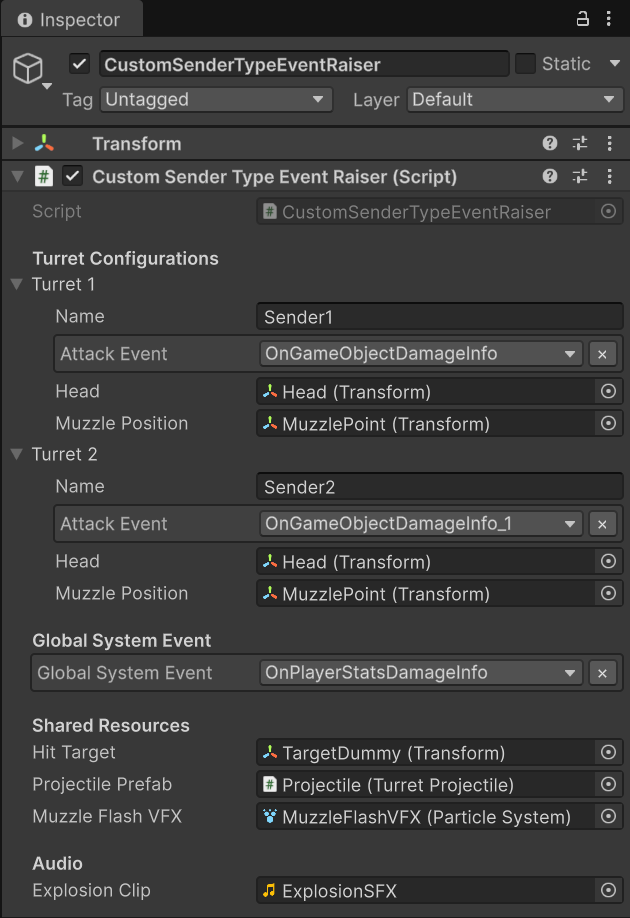
Turret Configurations:
Turret 1 (Red):
Name: "Sender1"Attack Event:OnGameObjectDamageInfo(GameObject sender)Head: SentryTurret_Red/Head (Transform for aiming)Muzzle Position: Head/MuzzlePoint (Transform for projectile spawn)
Turret 2 (Blue):
Name: "Sender2"Attack Event:OnGameObjectDamageInfo_1(GameObject sender)Head: SentryTurret_Blue/HeadMuzzle Position: Head/MuzzlePoint
Global System Event:
Global System Event:OnPlayerStatsDamageInfo(PlayerStats sender)
Shared Resources:
Hit Target: TargetDummy (Transform)Projectile Prefab: Projectile prefab for visual effectMuzzle Flash VFX: Particle system for firing effect
How It Works:
- Button click initiates turret attack sequence
- Turret rotates toward target (smooth tracking)
- When aligned, projectile spawns and travels
- On impact, event is raised with turret GameObject as sender and DamageInfo as data
- For system damage, a
PlayerStatsinstance is created and used as sender
Receiver Setup (CustomSenderTypeEventReceiver)
Select the CustomSenderTypeEventReceiver GameObject in the Hierarchy:
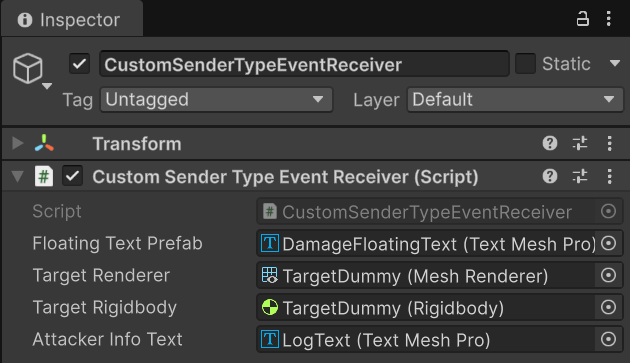
Reference Configuration:
Floating Text Prefab: DamageFloatingText (Text Mesh Pro)Target Renderer: TargetDummy (Mesh Renderer for flash effect)Target Rigidbody: TargetDummy (Rigidbody for physics)Attacker Info Text: LogText (Text Mesh Pro for displaying sender name)
Behavior Binding:
Two separate receiver methods handle different sender types:
| Event | Bound Method | Signature |
|---|---|---|
OnGameObjectDamageInfo | OnTurretAttackReceived | void (GameObject sender, DamageInfo args) |
OnGameObjectDamageInfo_1 | OnTurretAttackReceived | void (GameObject sender, DamageInfo args) |
OnPlayerStatsDamageInfo | OnSystemAttackReceived | void (PlayerStats sender, DamageInfo args) |
Context-Aware Logic:
- Physical sender: Uses
sender.transform.positionfor spatial rotation - Logical sender: Uses
sender.playerNameandsender.levelfor display
💻 Code Breakdown
📤 CustomSenderTypeEventRaiser.cs (Sender)
using UnityEngine;
using TinyGiants.GameEventSystem.Runtime;

public class CustomSenderTypeEventRaiser : MonoBehaviour
{
    [System.Serializable]
    private class TurretConfig
    {
        public string name;
        [GameEventDropdown] public GameEvent<GameObject, DamageInfo> attackEvent;
        public Transform head;
        public Transform muzzlePosition;
        [HideInInspector] public bool isAttacking;
    }

    [Header("Turret Configurations")]
    [SerializeField] private TurretConfig turret1;
    [SerializeField] private TurretConfig turret2;

    [Header("Global System Event")]
    [GameEventDropdown] public GameEvent<PlayerStats, DamageInfo> globalSystemEvent;

    private PlayerStats _localPlayerStats;

    private void Start()
    {
        // Create a logical sender (no GameObject representation)
        _localPlayerStats = new PlayerStats("DragonSlayer_99", 99, 1);
    }

    /// <summary>
    /// Called by Turret Damage button.
    /// Initiates attack sequence: Aim → Fire → Hit → Raise Event with GameObject sender
    /// </summary>
    public void RaiseTurretDamage()
    {
        InitiateAttack(turret1);
    }

    /// <summary>
    /// Called by Turret2 Damage button.
    /// </summary>
    public void RaiseTurret2Damage()
    {
        InitiateAttack(turret2);
    }

    private void InitiateAttack(TurretConfig turret)
    {
        if (turret.attackEvent == null) return;

        turret.isAttacking = true;
        Debug.Log($"[{turret.name}] Target acquired. Aiming...");
    }

    private void OnProjectileHit(TurretConfig turret)
    {
        if (turret.attackEvent == null) return;

        Vector3 hitPos = hitTarget.position;
        DamageInfo info = new DamageInfo(15f, false, DamageType.Physical, hitPos, "Sentry Turret");

        // KEY: Pass the turret's GameObject as sender
        GameObject turretRoot = turret.head.parent.gameObject;
        turret.attackEvent.Raise(turretRoot, info);

        Debug.Log($"[{turret.name}] Projectile Impact! Event Raised.");
    }

    /// <summary>
    /// Simulates a system-level attack from a logical entity.
    /// </summary>
    public void RaiseSystemDamage()
    {
        if (globalSystemEvent == null) return;

        Vector3 hitPos = hitTarget != null ? hitTarget.position : Vector3.zero;
        DamageInfo info = new DamageInfo(50f, true, DamageType.Void, hitPos, "GameMaster");

        // KEY: Pass the PlayerStats instance as sender (not a GameObject)
        globalSystemEvent.Raise(_localPlayerStats, info);

        Debug.Log("[GameMaster] Global system damage event raised.");
    }
}
Key Points:
- 🎯 Dual-Generic Syntax -
GameEvent<TSender, TArgs>requires two type parameters - 🏗️ Sender Flexibility - Can pass
GameObjectOR custom C# classes - 📦
.Raise(sender, data)- Two-parameter method provides both context and payload - 🎮 Physical Senders - Use actual scene GameObjects for spatial context
- 💡 Logical Senders - Use data classes for non-spatial context
📥 CustomSenderTypeEventReceiver.cs (Listener)
using UnityEngine;
using TMPro;
using System.Collections;

public class CustomSenderTypeEventReceiver : MonoBehaviour
{
    [SerializeField] private TextMeshPro floatingTextPrefab;
    [SerializeField] private Renderer targetRenderer;
    [SerializeField] private Rigidbody targetRigidbody;
    [SerializeField] private TextMeshPro attackerInfoText;

    /// <summary>
    /// Bound to: GameEvent<GameObject, DamageInfo>
    /// Handles physical attackers with scene presence.
    /// </summary>
    /// <param name="sender">The GameObject that attacked (the Turret)</param>
    /// <param name="args">The damage details</param>
    public void OnTurretAttackReceived(GameObject sender, DamageInfo args)
    {
        // Use sender's Transform for spatial logic
        if (sender != null)
        {
            // Smoothly rotate to face the attacker
            StartCoroutine(SmoothLookAtRoutine(sender.transform.position));
            Debug.Log($"[Receiver] Ouch! Hit by {sender.name}.");
        }

        // Display the sender's GameObject name
        if (attackerInfoText != null)
        {
            attackerInfoText.text = $"SenderName : <color=yellow>{sender.name}</color>";
        }

        // Common feedback: floating text, flash, knockback
        ProcessCommonFeedback(args, Color.yellow);
    }

    /// <summary>
    /// Bound to: GameEvent<PlayerStats, DamageInfo>
    /// Handles logical attackers without scene representation.
    /// </summary>
    /// <param name="sender">The PlayerStats object with profile data</param>
    /// <param name="args">The damage details</param>
    public void OnSystemAttackReceived(PlayerStats sender, DamageInfo args)
    {
        // Use sender's properties for data-driven logic
        if (attackerInfoText != null)
        {
            attackerInfoText.text = $"SenderName : <color=yellow>{sender.playerName}</color>";
        }

        Debug.Log($"[Receiver] Logical attack from {sender.playerName}. " +
                  $"FactionID: {sender.factionId}");

        // Common feedback with different color for system damage
        ProcessCommonFeedback(args, Color.magenta);
    }

    private void ProcessCommonFeedback(DamageInfo args, Color color)
    {
        // Floating damage text
        if (floatingTextPrefab)
        {
            string text = args.isCritical ? $"{args.amount}!" : args.amount.ToString();
            ShowFloatingText(text, color, args.hitPoint);
        }

        // Color flash
        StartCoroutine(FlashColorRoutine(Color.red));

        // Physics knockback (stronger for crits)
        ApplyPhysicsKnockback(args);

        // Camera shake for critical hits
        if (args.isCritical)
        {
            StartCoroutine(ShakeCameraRoutine(0.2f, 0.4f));
        }
    }

    private IEnumerator SmoothLookAtRoutine(Vector3 targetPos)
    {
        Vector3 direction = targetPos - transform.position;
        direction.y = 0;

        if (direction != Vector3.zero)
        {
            Quaternion targetRot = Quaternion.LookRotation(direction);
            float time = 0f;
            Quaternion startRot = transform.rotation;

            // Smooth rotation over time
            while(time < 1f)
            {
                time += Time.deltaTime * 5f;
                transform.rotation = Quaternion.Slerp(startRot, targetRot, time);
                yield return null;
            }
        }
    }
}
Key Points:
- 🎯 Signature Matching - Each method signature must match its event's generic types
- 🧭 Spatial Logic -
GameObjectsenders enable position-based reactions (rotation, distance checks) - 📊 Data Logic -
PlayerStatssenders enable profile-based reactions (name display, faction checks) - 🔀 Unified Feedback - Common effects (flash, knockback) apply to both sender types
- 🎨 Context-Specific Behavior - Rotation only happens for physical senders
🔑 Key Takeaways
| Concept | Implementation |
|---|---|
| 🎯 Dual-Generic Events | GameEvent<TSender, TArgs> provides both sender context and data payload |
| 🏗️ Sender Flexibility | Supports both Unity GameObjects and pure C# classes |
| 🧭 Spatial Context | GameObject senders enable position/rotation-based logic |
| 📊 Data Context | Custom class senders enable profile/property-based logic |
| 🔀 Unified Handling | One receiver can handle multiple sender types intelligently |
Sender-aware events are perfect when who triggered the event matters as much as what happened. Use GameObject senders for spatial reactions (facing, targeting, distance) and custom class senders for data-driven logic (profiles, factions, stats). This pattern is ideal for combat systems, AI reactions, and multiplayer attribution!
🎯 What's Next?
You've mastered sender-aware events. Now let's explore how to control event execution order with priority systems.
Next Chapter: Learn about event priorities in 05 Priority Event
📚 Related Documentation
- Game Event Creator - How to create sender-aware events
- Raising Events - API for
.Raise(sender, args) - Listening Strategies - Advanced callback patterns
- API Reference - Complete dual-generic event API