10 Trigger Event: Parallel Event Dispatch
📋 Overview
In complex games, one action (like "Attack Command") often needs to trigger multiple independent systems: combat logic, sound effects, UI updates, achievements, analytics, etc. Implementing this in code leads to bloated functions with dozens of lines. The Flow Graph visualizes this as parallel dispatch—one root event fans out to multiple conditional branches, each with its own priority and filtering logic.
- How to use the Flow Graph for visual event routing
- Parallel execution vs sequential priority ordering
- Conditional branching with node conditions
- Type conversion and argument filtering in trigger nodes
- The difference between Trigger Events and Chain Events
🎬 Demo Scene
Assets/TinyGiants/GameEventSystem/Demo/10_TriggerEvent/10_TriggerEvent.unity
Scene Composition
Visual Elements:
-
🔴 Turret_A (Left) - Red "Smart" turret
- Priority Order: Buff (100) → Fire (50)
- Result: Critical Hit
-
🔵 Turret_B (Right) - Blue "Glitchy" turret
- Priority Order: Fire (100) → Buff (30)
- Result: Weak Hit (buff arrives too late)
-
🎯 TargetDummy - Center capsule target
- Receives damage from both turrets
- Has Rigidbody for physics reactions
-
📺 HoloDisplay - Information panel
- Displays damage data logs
- Shows "SYSTEM READY" by default
- Updates with damage info when triggered
-
🚨 AlarmVignette - Fullscreen red overlay
- Flashes when global alarm triggers
- Independent of turret-specific branches
UI Layer (Canvas):
- 🎮 Two Command Buttons - Bottom of the screen
- "Command A" → Triggers
TriggerEventRaiser.CommandTurretA() - "Command B" → Triggers
TriggerEventRaiser.CommandTurretB()
- "Command A" → Triggers
Game Logic Layer:
-
📤 TriggerEventRaiser - Command issuer
- Only references ONE root event:
onCommand - Completely unaware of downstream events
- Ultimate decoupling demonstration
- Only references ONE root event:
-
📥 TriggerEventReceiver - Action executor
- Contains 5 independent action methods
- Flow Graph orchestrates which methods execute when
- Methods have different signatures (void, single arg, dual args)
🎮 How to Interact
The Parallel Dispatch Experiment
One root event (onCommand) splits into multiple parallel branches based on conditions and priorities.
Step 1: Enter Play Mode
Press the Play button in Unity.
Initial State:
- Two turrets idle (slow rotation sweep)
- HoloDisplay shows "SYSTEM READY"
- No alarm vignette visible
Step 2: Test Smart Turret (Correct Priority)
Click "Command A":
What Happens:
- 🎯 Red turret rotates toward target (fast tracking)
- 🚀 Projectile fires and travels
- 💥 On impact - Root event raised with
Turret_Aas sender
Parallel Execution Branches:
Branch 1: Turret A Specific (Conditional):
-
✅ onActiveBuff (Priority 100)
- Condition:
sender.name.Contains("Turret_A")→ TRUE - Executes FIRST due to highest priority
- Turret turns gold, buff aura spawns
- Sets
_isBuffedA = true - Console:
[Receiver] (A) SYSTEM OVERCHARGE: Buff Activated for Turret_A.
- Condition:
-
✅ onTurretFire (Priority 50)
- Condition:
sender.name.Contains("Turret_A")→ TRUE - Executes SECOND (lower priority than Buff)
- Checks
_isBuffedA→ finds it TRUE - Result: CRIT! -500 damage
- Orange floating text, explosion VFX, camera shake
- Console:
[Receiver] (B) TURRET HIT: Critical Strike! (500 dmg)
- Condition:
Branch 2: Global (Unconditional):
-
✅ onHoloData (Priority 1s delay)
- No condition → always executes
- Type conversion: Drops
GameObjectsender, passes onlyDamageInfo - HoloDisplay updates: "Damage DATA Type: Physical, Target: 100"
- Console:
[Receiver] (C) HOLO DATA: Recorded 100 damage packet.
-
✅ onGlobalAlarm (Priority immediate, void)
- No condition → always executes
- Type conversion: Drops all arguments
- Screen flashes red 3 times
- Alarm sound plays
- Console:
[Receiver] (D) ALARM: HQ UNDER ATTACK! EMERGENCY PROTOCOL!
-
✅ onSecretFire (Priority 1s delay, argument blocked)
- No condition → always executes
- PassArgument = false → receives default/null values
- Console:
[Receiver] (E) SECURE LOG: Data transmission blocked by Graph.
Result: ✅ Smart turret achieves critical hit because buff applied BEFORE damage calculation.
Step 3: Test Glitchy Turret (Wrong Priority)
Click "Command B":
What Happens:
- 🎯 Blue turret rotates toward target
- 🚀 Projectile fires and travels
- 💥 On impact - Root event raised with
Turret_Bas sender
Parallel Execution Branches:
Branch 1: Turret B Specific (Conditional):
-
❌ onActiveBuff (Turret A condition)
- Condition:
sender.name.Contains("Turret_A")→ FALSE - NOT EXECUTED - filtered out by condition
- Condition:
-
✅ onTurretFire (Priority 100) - Different node than Turret A
- Condition:
sender.name.Contains("Turret_B")→ TRUE - Executes FIRST (highest priority in Turret B branch)
- Checks
_isBuffedB→ finds it FALSE (buff hasn't run yet) - Result: -100 normal damage
- Grey floating text, small explosion
- Console:
[Receiver] (B) TURRET HIT: Normal Hit. (100 dmg)
- Condition:
-
✅ onActiveBuff (Priority 30) - Different node than Turret A
- Condition:
sender.name.Contains("Turret_B")→ TRUE - Executes SECOND (lower priority)
- Turret turns gold, buff aura spawns
- Sets
_isBuffedB = trueTOO LATE! - Console:
[Receiver] (A) SYSTEM OVERCHARGE: Buff Activated for Turret_B.
- Condition:
Branch 2: Global (Unconditional):
- Same 3 global nodes execute (onHoloData, onGlobalAlarm, onSecretFire)
- Independent of which turret fired
Result: ❌ Glitchy turret gets normal hit because damage calculated BEFORE buff applied.
Both turrets trigger the same root event (onCommand), but:
- Conditional nodes filter by sender name
- Priority order within each branch determines outcome
- Global nodes execute regardless of sender
- All branches evaluate in parallel (same frame)
🏗️ Scene Architecture
Parallel vs Sequential Execution
Traditional Sequential Code:
void OnAttackCommand(GameObject sender, DamageInfo info)
{
    if (sender.name == "Turret_A") ActivateBuff(sender, info);
    TurretHit(sender, info);
    if (sender.name == "Turret_A") ActivateBuff(sender, info); // Wrong order!
    HoloDamageData(info);
    GlobalAlarm();
    LogSecretAccess(sender, info);
}
Flow Graph Parallel Dispatch:
📡 Root: onCommand.Raise(sender, info)
│
├─ 🔱 [ Conditional Branch: Turret A ] ➔ 🛡️ Guard: `Sender == "Turret_A"`
│  ├─ 💎 [Prio: 100] ➔ onActiveBuff()   ✅ Executes 1st
│  └─ ⚡ [Prio: 50 ] ➔ onTurretFire()   ✅ Executes 2nd
│
├─ 🔱 [ Conditional Branch: Turret B ] ➔ 🛡️ Guard: `Sender == "Turret_B"`
│  ├─ ⚡ [Prio: 100] ➔ onTurretFire()   ✅ Executes 1st
│  └─ 💎 [Prio: 30 ] ➔ onActiveBuff()   ✅ Executes 2nd
│
└─ 🌍 [ Global Branch: Always Run ]   ➔ 🟢 Guard: `None (Always Pass)`
   ├─ 📽️ onHoloData       ⏱️ Delay: 1.0s | 🔢 Single Arg
   ├─ 🚨 onGlobalAlarm    ⚡ Immediate   | 🔘 Void (Signal Only)
   └─ 🕵️ onSecretFire     ⏱️ Delay: 1.0s | 🛡️ Blocked Args
Execution Behavior:
- All branches evaluate simultaneously (parallel)
- Conditions filter which nodes execute
- Priority determines order within passing branches
- Type conversion happens automatically per node
Event Definitions
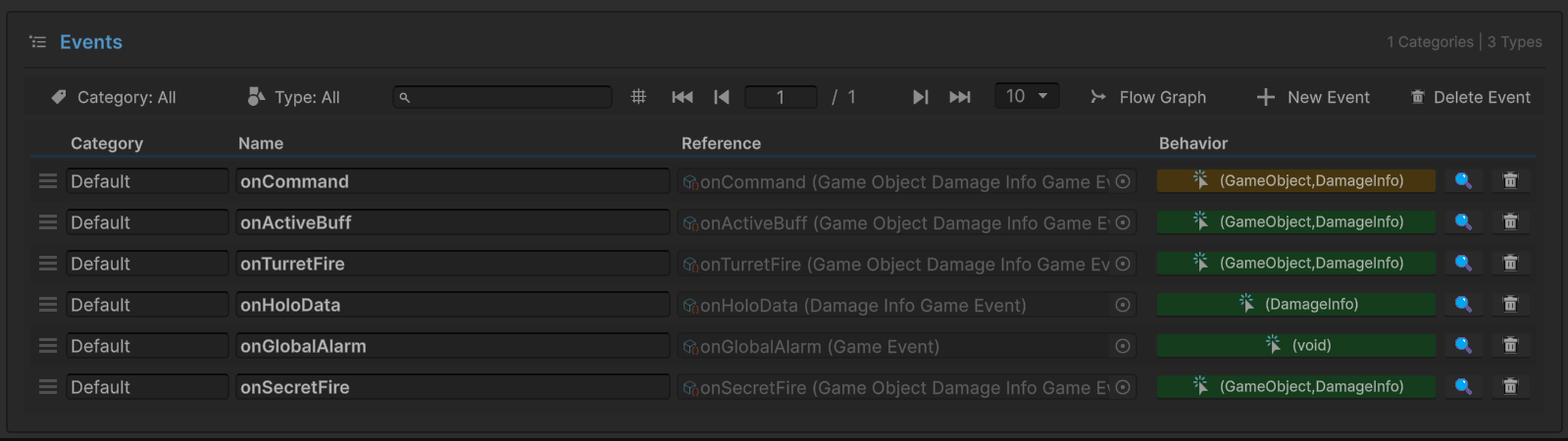
| Event Name | Type | Role | Color |
|---|---|---|---|
onCommand | GameEvent<GameObject, DamageInfo> | Root | Gold |
onActiveBuff | GameEvent<GameObject, DamageInfo> | Trigger | Green |
onTurretFire | GameEvent<GameObject, DamageInfo> | Trigger | Green |
onHoloData | GameEvent<DamageInfo> | Trigger | Green |
onGlobalAlarm | GameEvent (void) | Trigger | Green |
onSecretFire | GameEvent<GameObject, DamageInfo> | Trigger | Green |
Key Insight:
- Root event (gold): Only one directly raised by code
- Trigger events (green): Automatically triggered by Flow Graph
- Code only knows about
onCommand—completely decoupled from downstream logic
Flow Graph Configuration
Click "Flow Graph" button in the Game Event Editor to open the visual graph:
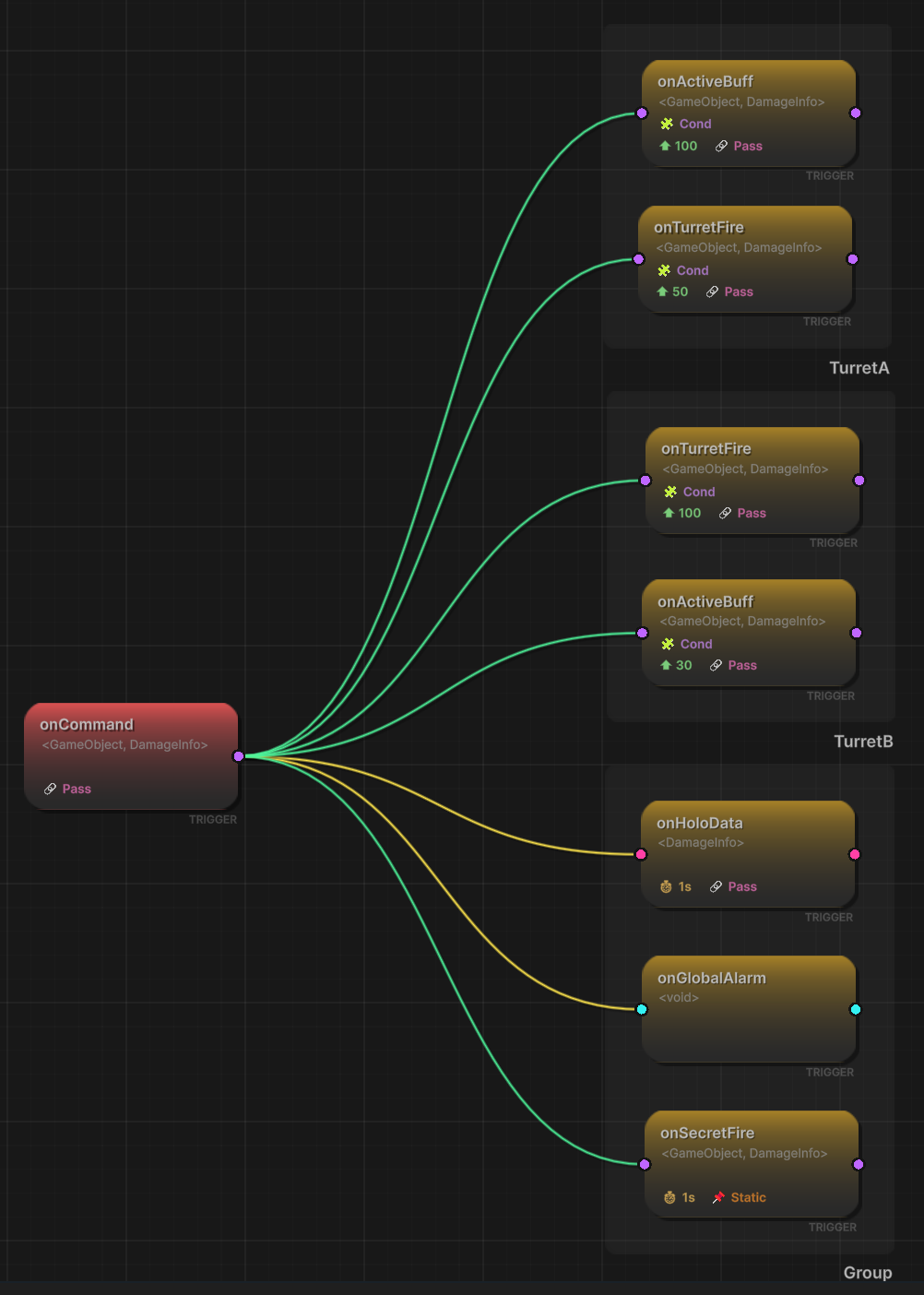
Graph Structure:
Root Node (Left, Red):
onCommand <GameObject, DamageInfo>- Entry point for entire graph
- Single node raised by code
Turret A Branch (Top Right, Green):
onActiveBuff(Priority: ★100, Condition: Turret_A, Pass: ✓)- Highest priority in branch
- Only executes if sender is Turret_A
onTurretFire(Priority: ★50, Condition: Turret_A, Pass: ✓)- Second priority
- Only executes if sender is Turret_A
Turret B Branch (Middle Right, Green):
onTurretFire(Priority: ★100, Condition: Turret_B, Pass: ✓)- Highest priority in branch
- Only executes if sender is Turret_B
onActiveBuff(Priority: ★30, Condition: Turret_B, Pass: ✓)- Lower priority (executes after Fire!)
- Only executes if sender is Turret_B
Global Branch (Bottom Right, Yellow/Green):
onHoloData(Delay: ⏱️1s, Pass: 🔴 Single Arg Only)- Type conversion:
<GameObject, DamageInfo>→<DamageInfo> - Yellow line indicates type compatibility warning
- Type conversion:
onGlobalAlarm(Pass: ⭕ Void)- Type conversion:
<GameObject, DamageInfo>→(void) - Drops all arguments
- Type conversion:
onSecretFire(Delay: ⏱️1s, Pass: 🔒 Static/Blocked)- PassArgument = false
- Receives default/null values
Legend:
- 🟢 Green Lines: Type match (compatible)
- 🟡 Yellow Lines: Type conversion (compatible with data loss)
- 🔴 Red Lines: Type incompatible (won't connect)
The Flow Graph provides instant visual understanding of:
- Which events trigger which downstream events
- Execution priorities within branches
- Type conversions and argument passing
- Conditional routing logic
- Parallel execution structure
Sender Setup (TriggerEventRaiser)
Select the TriggerEventRaiser GameObject:
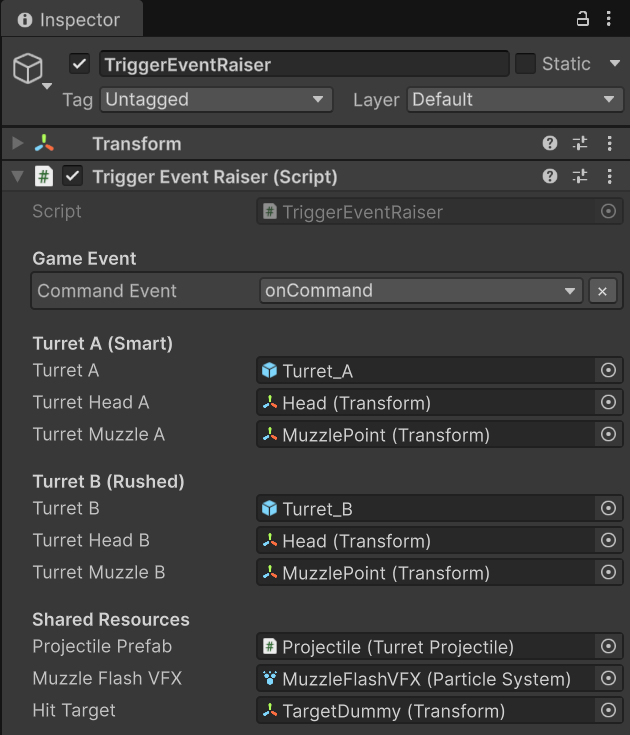
Game Event:
Command Event:onCommand- Tooltip: "The ONE event that triggers the whole graph"
- Type:
GameEvent<GameObject, DamageInfo>
Turret A (Smart):
Turret A: Turret_A (GameObject)Turret Head A: Head (Transform)Turret Muzzle A: MuzzlePoint (Transform)
Turret B (Rushed):
Turret B: Turret_B (GameObject)Turret Head B: Head (Transform)Turret Muzzle B: MuzzlePoint (Transform)
Shared Resources:
Projectile Prefab,Muzzle Flash VFX,Hit Target
Critical Observation: Script only references ONE event. It has NO KNOWLEDGE of the 5 downstream events. This is ultimate decoupling—the Flow Graph handles all routing logic.
Receiver Setup (TriggerEventReceiver)
Select the TriggerEventReceiver GameObject:
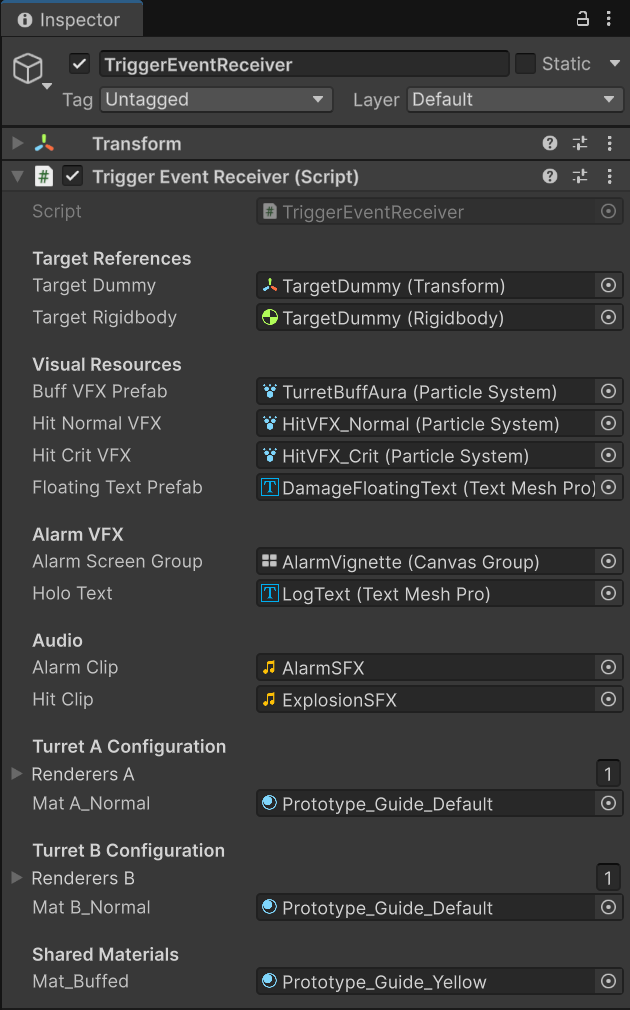
Target References:
Target Dummy,Target Rigidbody
Visual Resources:
Buff VFX Prefab: TurretBuffAura (Particle System)Hit Normal VFX,Hit Crit VFX,Floating Text Prefab
Alarm VFX:
Alarm Screen Group: AlarmVignette (Canvas Group)Holo Text: LogText (Text Mesh Pro)
Turret Configurations:
- Turret A: Renderers array, Normal material
- Turret B: Renderers array, Normal material
- Shared: Buffed material (gold)
💻 Code Breakdown
📤 TriggerEventRaiser.cs (Sender)
using UnityEngine;
using TinyGiants.GameEventSystem.Runtime;

public class TriggerEventRaiser : MonoBehaviour
{
    [Header("Game Event")]
    [Tooltip("The ONE event that triggers the whole graph.")]
    [GameEventDropdown]
    public GameEvent<GameObject, DamageInfo> commandEvent;

    [Header("Turret A (Smart)")]
    public GameObject turretA;
    // ... turret references ...

    private bool _isAttackingA;
    private bool _isAttackingB;

    /// <summary>
    /// Button A: Signals Turret A to attack.
    /// Starts the aiming sequence, which culminates in raising the root event.
    /// </summary>
    public void CommandTurretA()
    {
        if (commandEvent == null || turretA == null) return;
        _isAttackingA = true; // Begin rotation/fire sequence
    }

    /// <summary>
    /// Button B: Signals Turret B to attack.
    /// </summary>
    public void CommandTurretB()
    {
        if (commandEvent == null || turretB == null) return;
        _isAttackingB = true;
    }

    private void FireProjectile(GameObject senderTurret, Transform muzzle)
    {
        // Spawn muzzle flash, launch projectile...

        var shell = Instantiate(projectilePrefab, muzzle.position, muzzle.rotation);
        shell.Initialize(hitTarget.position, 20f, () =>
        {
            Vector3 hitPos = hitTarget.position;
            DamageInfo info = new DamageInfo(100f, false, DamageType.Physical,
                                            hitPos, "Commander");

            // CRITICAL: Raise the ONE root event
            // The Flow Graph decides everything else:
            // - Which downstream events trigger
            // - In what priority order
            // - With what arguments
            commandEvent.Raise(senderTurret, info);

            Debug.Log($"[Sender] Impact confirmed from {senderTurret.name}. " +
                     "Event Raised.");
        });
    }
}
Key Points:
- 🎯 Single Event Reference - Only knows about root event
- 🔇 Zero Downstream Knowledge - No idea about 5 trigger events
- 📡 Simple API - Just
.Raise(sender, data) - 🏗️ Maximum Decoupling - Flow Graph handles all routing
📥 TriggerEventReceiver.cs (Listener)
using UnityEngine;
using System.Collections;

public class TriggerEventReceiver : MonoBehaviour
{
    private bool _isBuffedA;
    private bool _isBuffedB;

    /// <summary>
    /// [Action A] Activate Buff
    /// Bound to Trigger nodes in Flow Graph (separate nodes for Turret A and B).
    ///
    /// Priority Impact:
    /// - Turret A: Priority 100 → Executes BEFORE damage (correct)
    /// - Turret B: Priority 30 → Executes AFTER damage (wrong!)
    /// </summary>
    public void ActivateBuff(GameObject sender, DamageInfo args)
    {
        if (sender == null) return;
        bool isA = sender.name.Contains("Turret_A");

        // Set the critical flag
        if (isA) _isBuffedA = true;
        else _isBuffedB = true;

        // Visual feedback: Gold material + particle aura
        Renderer[] targetRenderers = isA ? renderersA : renderersB;
        foreach (var r in targetRenderers)
            if (r) r.material = mat_Buffed;

        if (buffVFXPrefab)
        {
            var vfx = Instantiate(buffVFXPrefab, sender.transform.position,
                                 Quaternion.identity);
            vfx.transform.SetParent(sender.transform);
            vfx.Play();

            if (isA) _auraA = vfx;
            else _auraB = vfx;
        }

        Debug.Log($"[Receiver] (A) SYSTEM OVERCHARGE: Buff Activated for {sender.name}.");
    }

    /// <summary>
    /// [Action B] Turret Hit
    /// Bound to Trigger nodes in Flow Graph (separate nodes for Turret A and B).
    ///
    /// Checks buff state AT MOMENT OF EXECUTION.
    /// Priority determines whether buff is active yet.
    /// </summary>
    public void TurretHit(GameObject sender, DamageInfo args)
    {
        if (sender == null) return;

        // Check if buff is currently active
        bool isBuffed = sender.name.Contains("Turret_A") ? _isBuffedA : _isBuffedB;

        float finalDamage = args.amount;
        bool isCrit = false;
        ParticleSystem vfxToPlay;

        if (isBuffed)
        {
            // CRITICAL PATH: Buff was active
            finalDamage *= 5f; // 500 damage
            isCrit = true;
            vfxToPlay = hitCritVFX;

            StartCoroutine(ShakeCameraRoutine(0.2f, 0.4f));
            Debug.Log($"[Receiver] (B) TURRET HIT: Critical Strike! ({finalDamage} dmg)");
        }
        else
        {
            // NORMAL PATH: Buff wasn't active yet
            vfxToPlay = hitNormalVFX;
            Debug.Log($"[Receiver] (B) TURRET HIT: Normal Hit. ({finalDamage} dmg)");
        }

        // Spawn VFX, apply physics, show floating text...
        StartCoroutine(ResetRoutine(sender, isBuffed));
    }

    /// <summary>
    /// [Action C] Holo Damage Data
    /// Bound to Trigger node with TYPE CONVERSION.
    ///
    /// Graph configuration:
    /// - Input: GameEvent<GameObject, DamageInfo>
    /// - Output: GameEvent<DamageInfo>
    /// - Result: Sender is dropped, only data is passed
    /// </summary>
    public void HoloDamageData(DamageInfo info)
    {
        if (holoText)
        {
            holoText.text = $"Damage DATA\nType: {info.type}, Target: {info.amount}";
        }

        Debug.Log($"[Receiver] (C) HOLO DATA: Recorded {info.amount} damage packet.");
        StartCoroutine(ClearLogRoutine());
    }

    /// <summary>
    /// [Action D] Global Alarm
    /// Bound to Trigger node with TYPE CONVERSION to VOID.
    ///
    /// Graph configuration:
    /// - Input: GameEvent<GameObject, DamageInfo>
    /// - Output: GameEvent (void)
    /// - Result: All arguments dropped
    /// </summary>
    public void GlobalAlarm()
    {
        Debug.Log("[Receiver] (D) ALARM: HQ UNDER ATTACK! EMERGENCY PROTOCOL!");

        StopCoroutine(nameof(AlarmRoutine));
        if (alarmScreenGroup) StartCoroutine(AlarmRoutine());
    }

    /// <summary>
    /// [Action E] Secret Log
    /// Bound to Trigger node with PassArgument = FALSE.
    ///
    /// Demonstrates ARGUMENT BLOCKING:
    /// Even though root event has data, this node receives default/null values.
    /// Useful for security, debugging, or data isolation.
    /// </summary>
    public void LogSecretAccess(GameObject sender, DamageInfo data)
    {
        bool isBlocked = (data == null || (data.amount == 0 && data.attacker == null));

        if (isBlocked)
            Debug.Log("<color=lime>[Receiver] (E) SECURE LOG: " +
                     "Data transmission blocked by Graph.</color>");
        else
            Debug.Log("<color=red>[Receiver] (E) SECURE LOG: " +
                     "Data LEAKED! ({data.amount})</color>");
    }

    private IEnumerator AlarmRoutine()
    {
        int flashes = 3;
        float flashDuration = 0.5f;

        for (int i = 0; i < flashes; i++)
        {
            if (alarmClip) _audioSource.PlayOneShot(alarmClip);

            // Sine wave alpha animation
            float t = 0f;
            while (t < flashDuration)
            {
                t += Time.deltaTime;
                float alpha = Mathf.Sin((t / flashDuration) * Mathf.PI);
                alarmScreenGroup.alpha = alpha * 0.8f;
                yield return null;
            }

            alarmScreenGroup.alpha = 0f;
            yield return new WaitForSeconds(0.1f);
        }
    }
}
Key Points:
- 🎯 5 Independent Methods - Each handles one action
- 🔀 Different Signatures - void, single arg, dual args
- 📊 State Dependency -
TurretHitreads_isBuffedA/Bflags - ⏱️ Priority Critical - Order determines if buff is active
- 🎨 Type Agnostic - Methods don't know about type conversion
🔑 Key Takeaways
| Concept | Implementation |
|---|---|
| 🌳 Flow Graph | Visual parallel dispatch replacing bloated code |
| 🎯 Trigger Nodes | Automatically fired downstream events |
| 📋 Conditional Routing | Node conditions filter execution |
| ⏱️ Priority Ordering | Controls execution sequence within branches |
| 🔀 Type Conversion | Automatic argument adaptation per node |
| 🔒 Argument Blocking | PassArgument flag controls data transmission |
| 📡 Parallel Execution | All branches evaluate simultaneously |
Trigger Events are perfect for:
- Fan-Out Architecture - One action triggers many systems
- Conditional Routing - Different logic paths based on sender/data
- Priority Management - Control execution order visually
- Type Adaptation - Connect incompatible event signatures
- Decoupling - Senders unaware of downstream complexity
Trigger vs Chain Events:
- Trigger (Parallel): All nodes evaluate simultaneously, filtered by conditions
- Chain (Sequential): Nodes execute in strict linear order, one after another
Use Trigger when you need parallel branching with conditions (e.g., combat system responding to different attackers). Use Chain when you need guaranteed sequential order (e.g., tutorial steps, cutscene sequences).
- Same Priority: If multiple nodes have identical priority, execution order is undefined
- Cross-Branch Priority: Priority only matters within the same conditional branch
- Delay Interaction: Delayed nodes may execute after non-delayed nodes regardless of priority
- State Mutations: Be careful with state changes—later nodes see earlier mutations
🎯 What's Next?
You've mastered parallel trigger events. Now let's explore chain events for guaranteed sequential execution.
Next Chapter: Learn about sequential chains in 11 Chain Event
📚 Related Documentation
- Flow Graph Editor - Edit Node Flow Graph
- Node & Connector - Understand the visual language of the graph
- Node Behavior - Node configuration and conditions
- Advanced Logic Patterns - How the system executes Triggers versus Chains
- Programmatic Flow - How to Implement Process Control via FlowGraph API
- Best Practices - Architectural patterns for complex systems