11 Chain Event: Sequential Execution Pipeline
📋 Overview
While Trigger Events execute in parallel with conditional filtering, Chain Events execute in strict sequential order—one step at a time, like a production pipeline. If any node in the chain fails its condition, delays, or encounters an error, the entire sequence pauses or terminates. This is perfect for cutscenes, weapon launch sequences, tutorial steps, or any workflow where order matters.
- The difference between Chain (sequential) and Trigger (parallel) execution
- How to use condition nodes as validation gates
- Delay nodes for timed pauses in sequences
- Wait-for-completion for asynchronous operations
- Early termination patterns when conditions fail
🎬 Demo Scene
Assets/TinyGiants/GameEventSystem/Demo/11_ChainEvent/11_ChainEvent.unity
Scene Composition
Visual Elements:
- 🔴 Turret_A (Left) - Red launcher
- 🔵 Turret_B (Right) - Blue launcher
- 🎯 TargetDummy - Center capsule target
- 📺 HoloDisplay - Status display panel
- Shows "SAFELOCK READY" when safety is off
- Shows "SAFELOCK ACTIVED" when safety is on
UI Layer (Canvas):
- 🎮 Three Buttons - Bottom of the screen
- "Launch A" → Triggers
ChainEventRaiser.RequestLaunchA() - "Launch B" → Triggers
ChainEventRaiser.RequestLaunchB() - "Toggle SafeLock" (Orange) → Triggers
ChainEventReceiver.ToggleSafetyLock()
- "Launch A" → Triggers
Game Logic Layer:
-
📤 ChainEventRaiser - Sequence initiator
- Only references ONE entry point:
0_StartSequence - No knowledge of downstream pipeline steps
- Only references ONE entry point:
-
📥 ChainEventReceiver - Step executor
- Contains 5 methods for each pipeline stage
- Exposes
IsSafetyCheckPassedproperty for condition validation - Contains
isSafetyLockDisengagedflag (toggle-able)
🎮 How to Interact
The 5-Step Launch Protocol
One root event (0_StartSequence) triggers a sequential pipeline with validation, delays, and async waiting.
Step 1: Enter Play Mode
Press the Play button in Unity.
Initial State:
- Safety lock: DISENGAGED (default)
- HoloDisplay: "SAFELOCK READY"
- Both turrets idle
Step 2: Test Successful Launch (Safety Off)
Current State Check:
- Ensure HoloDisplay shows "SAFELOCK READY"
- If not, click "Toggle SafeLock" to turn safety OFF
Click "Launch A":
Sequential Execution:
[Step 1: System Check] - Immediate
- 🔍 Condition Node evaluates
ChainEventReceiver.IsSafetyCheckPassedproperty - Property checks
isSafetyLockDisengagedflag - Result: TRUE ✅
- Console:
[Chain Step 1] Turret_A Checking... - Chain proceeds to Step 2
[Step 2: Charge] - 1.0s Delay
- ⏱️ Delay Node pauses execution for 1.0 second
- VFX: Charging particle effect spawns at turret
- Console:
[Chain Step 2] Turret_A Charging... - Graph waits exactly 1.0s before continuing
- After delay, chain proceeds to Step 3
[Step 3: Fire] - Immediate
- 🚀 Projectile instantiated and launched toward target
- Muzzle flash VFX at turret
- Console:
[Chain Step 3] Turret_A FIRED payload: 500 - Projectile travels to target
- Chain immediately proceeds to Step 4
[Step 4: Cool Down] - Wait For Completion
- 💨 Steam VFX particle system spawns
- 🕐 Wait Node - Graph pauses until VFX completes (2.0s)
- Console:
[Chain Step 4] Turret_A Cooldowning. - Unlike delay (fixed time), this waits for actual VFX completion
- After steam finishes, chain proceeds to Step 5
[Step 5: Archive] - Immediate (Arguments Blocked)
- 📝 Final logging step
- PassArgument = FALSE in graph → receives default/null values
- Console:
[Chain Step 5] Archived. Data Status: CLEAN - Turret unlocked for next use
- Chain completes successfully ✅
Timeline:
0.0s  → Step 1: System Check (instant)
0.0s  → Step 2: Charge starts
1.0s  → Step 3: Fire (after charge delay)
1.0s  → Step 4: CoolDown starts
3.0s  → Step 5: Archive (after steam VFX ~2s)
3.0s  → Sequence complete
Result: ✅ Full 5-step launch sequence executed successfully.
Step 3: Test Failed Launch (Safety On)
Click "Toggle SafeLock":
- Safety flag changes:
isSafetyLockDisengaged = false - HoloDisplay updates: "SAFELOCK ACTIVED"
- UI button color changes to orange (visual warning)
- Console:
[Chain Settings] Safety Lock Disengaged: False
Click "Launch B":
Sequential Execution:
[Step 1: System Check] - FAILS ❌
- 🔍 Condition Node evaluates
ChainEventReceiver.IsSafetyCheckPassed - Property checks
isSafetyLockDisengaged→ finds FALSE - Property executes failure feedback:
- 🚨 Red alarm vignette flashes 3 times
- Alarm sound plays
- Console:
[Chain Blocked] Safety Check Failed. Sequence stopped immediately.
- Condition returns FALSE
- 🛑 CHAIN TERMINATES HERE
[Steps 2-5] - NEVER EXECUTE
- ❌ No charging VFX
- ❌ No projectile fired
- ❌ No steam cooldown
- ❌ No archive log
Result: ❌ Launch aborted at gate. Steps 2-5 never ran.
When a Chain node's condition fails:
- Immediate Termination - Execution stops at that node
- No Downstream Execution - Subsequent nodes never run
- No Partial Completion - All-or-nothing behavior
- Early Cleanup - Resources unlocked immediately
This is fundamentally different from Trigger Events, where failed conditions just skip individual branches while others continue.
🏗️ Scene Architecture
Chain vs Trigger: The Fundamental Difference
Trigger Event (Parallel):
⚡ Root Event: OnInteraction
│
├─ 🔱 Branch A: [ 🛡️ Guard: `HasKey == true` ]
│  └─ 🚀 Action: OpenDoor() ➔ ✅ Condition Passed: Executing...
│
├─ 🔱 Branch B: [ 🛡️ Guard: `PlayerLevel >= 10` ]
│  └─ 🚀 Action: GrantBonusXP() ➔ ❌ Condition Failed: Branch Skipped
│
└─ 🔱 Branch C: [ 🛡️ Guard: `Always True` ]
   └─ 🚀 Action: PlaySound("Click") ➔ ✅ Condition Passed: Executing...
│
📊 Summary: 2 Paths Executed | 1 Path Skipped | ⚡ Timing: Concurrent
Chain Event (Sequential):
🏆 Initiation: Root Event
│
├─ 1️⃣ [ Step 1 ] ➔ 🛡️ Guard: `Condition A`
│  └─ ⏳ Status: WAIT for completion... ✅ Success
│
├─ 2️⃣ [ Step 2 ] ➔ 🛡️ Guard: `Condition B`
│  └─ ⏳ Status: WAIT for completion... ✅ Success
│
├─ 3️⃣ [ Step 3 ] ➔ 🛡️ Guard: `Condition C`
│  └─ ⏳ Status: WAIT for completion... ❌ FAILED!
│
└─ 🛑 [ TERMINATED ] ➔ Logic Chain Halts
   └─ ⏭️ Step 4: [ SKIPPED ]
│
📊 Final Result: Aborted at Step 3 | ⏳ Mode: Strict Blocking
When to Use Each:
| Pattern | Use Chain | Use Trigger |
|---|---|---|
| Cutscene | ✅ Sequential shots | ❌ Steps out of order |
| Combat System | ❌ Rigid order not needed | ✅ Parallel systems |
| Tutorial | ✅ Must finish step 1 before step 2 | ❌ Steps can overlap |
| Weapon Charge | ✅ Charge → Fire → Cooldown | ❌ Order matters |
| Achievement | ❌ Independent checks | ✅ Multiple triggers |
Event Definitions
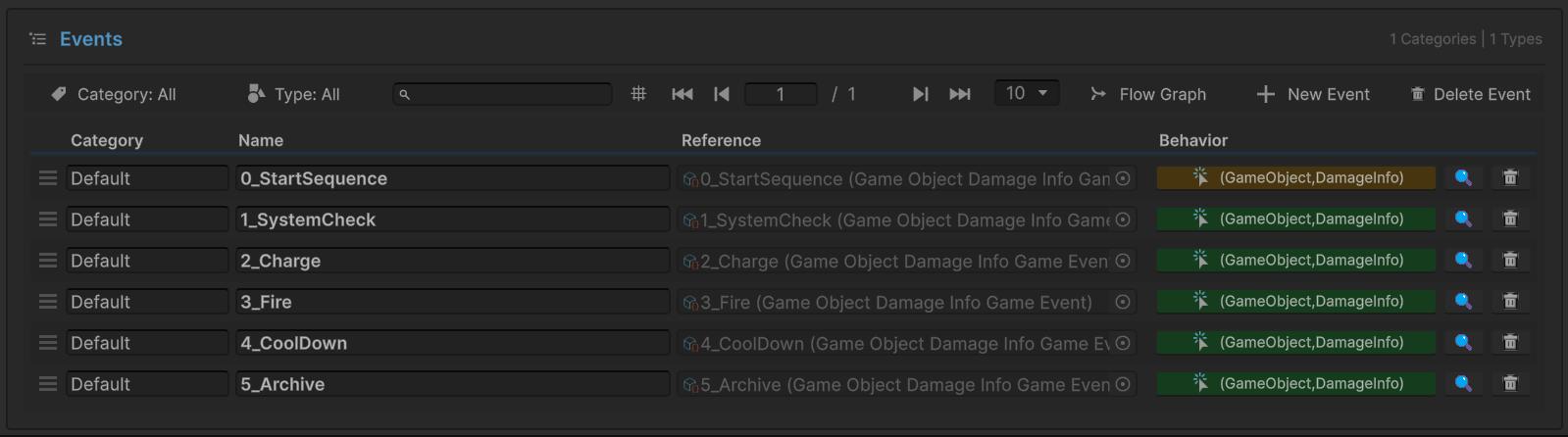
| Event Name | Type | Role | Step |
|---|---|---|---|
0_StartSequence | GameEvent<GameObject, DamageInfo> | Root (Gold) | Entry |
1_SystemCheck | GameEvent<GameObject, DamageInfo> | Chain (Green) | 1 |
2_Charge | GameEvent<GameObject, DamageInfo> | Chain (Green) | 2 |
3_Fire | GameEvent<GameObject, DamageInfo> | Chain (Green) | 3 |
4_CoolDown | GameEvent<GameObject, DamageInfo> | Chain (Green) | 4 |
5_Archive | GameEvent<GameObject, DamageInfo> | Chain (Green) | 5 |
Key Insight:
- Root raises the chain
- Chain nodes auto-trigger sequentially
- Code only calls
.Raise()on root—graph handles rest
Flow Graph Configuration
Click "Flow Graph" button to visualize the sequential pipeline:
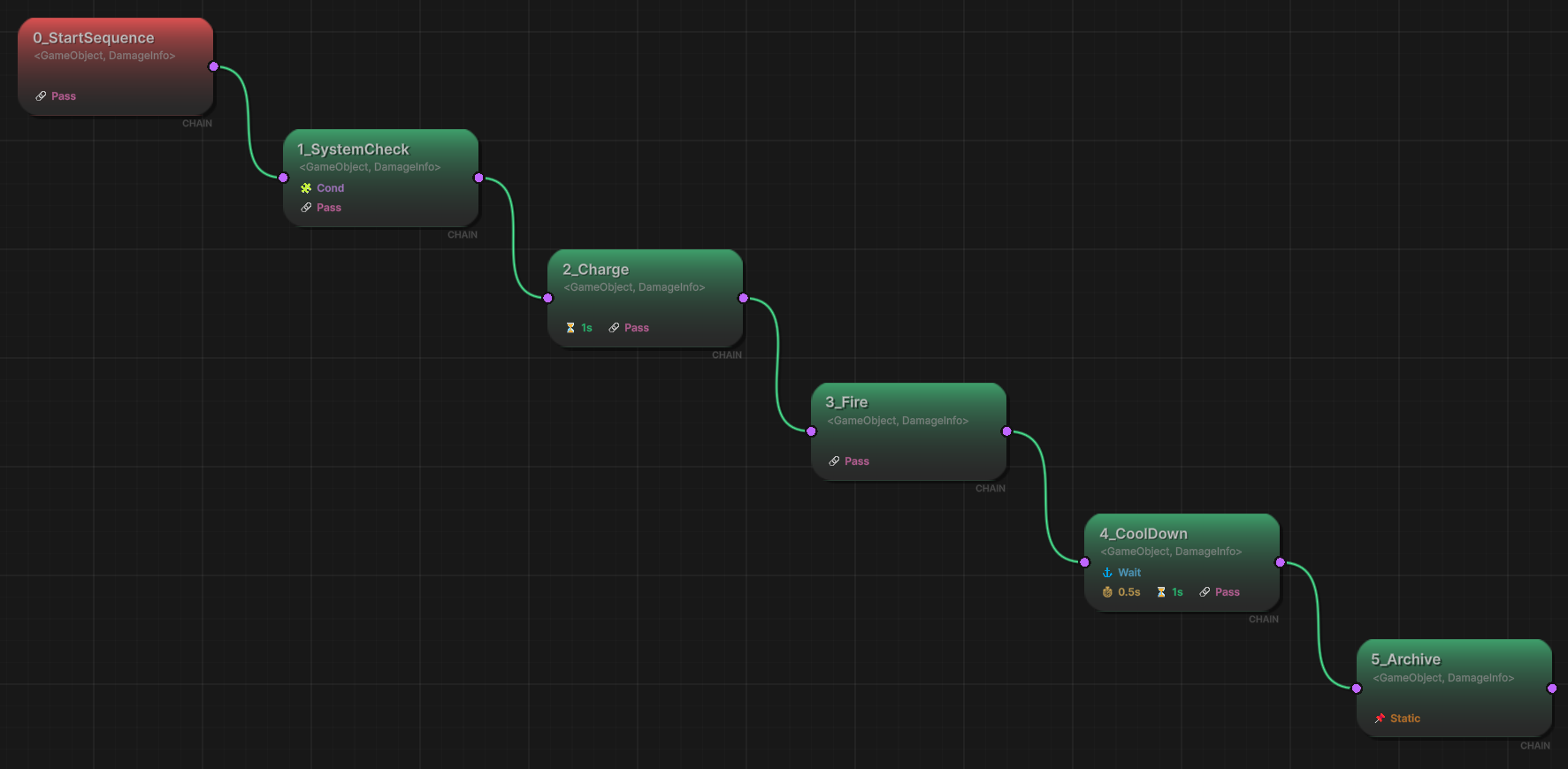
Graph Structure (Left to Right):
Node 1: 0_StartSequence (Root, Red)
- Entry point raised by code
- Type:
GameEvent<GameObject, DamageInfo> - Connects to first chain node
Node 2: 1_SystemCheck (Chain, Green)
- ✅ Condition Node - Gate keeper
- Condition:
ChainEventReceiver.IsSafetyCheckPassed == true- Evaluates scene object property at runtime
- If false → chain breaks immediately
- Action:
ChainEventReceiver.OnSystemCheck(sender, args) - Green checkmark icon indicates condition enabled
- PassArgument: ✓ Pass (full data forwarded)
Node 3: 2_Charge (Chain, Green)
- ⏱️ Delay Node - Timed pause
- Delay:
1.0seconds (shown as ⏱️ 1s icon) - Action:
ChainEventReceiver.OnStartCharging(sender, args) - Graph freezes here for exactly 1 second
- PassArgument: ✓ Pass
Node 4: 3_Fire (Chain, Green)
- 🎯 Action Node - Standard execution
- Action:
ChainEventReceiver.OnFireWeapon(sender, args) - No delay, no condition
- Executes immediately after previous step
- PassArgument: ✓ Pass
Node 5: 4_CoolDown (Chain, Green)
- 🕐 Wait Node - Async completion
- Delay:
0.5s(minimum wait) - WaitForCompletion: ✓ Checked (shown as ⏱️ 1s icon)
- Graph waits for receiver coroutine to finish
- Not a fixed timer—waits for actual completion signal
- Action:
ChainEventReceiver.OnCoolDown(sender, args) - PassArgument: ✓ Pass
Node 6: 5_Archive (Chain, Green)
- 🔒 Filter Node - Data sanitization
- Action:
ChainEventReceiver.OnSequenceArchived(sender, args) - PassArgument: 🔴 Static (argument blocked)
- Even though previous nodes passed full data
- This node receives default/null values
- Demonstrates data firewall at end of chain
- Final step—no downstream nodes
Connection Lines:
- 🟢 Green "CHAIN" lines - Sequential flow
- Each output port connects to next input port
- Linear topology—no branching
- Execution follows line left-to-right
Legend:
- 🔴 Root Node - Entry point (raised by code)
- 🟢 Chain Node - Auto-triggered in sequence
- ✅ Checkmark Icon - Condition enabled
- ⏱️ Clock Icon - Delay or wait configured
- 🔒 Static Icon - Arguments blocked
The Chain Graph provides instant understanding of:
- Sequential Order - Left-to-right flow shows exact execution order
- Validation Gates - Condition nodes act as checkpoints
- Timing Control - Delay/wait icons show pause points
- Data Flow - PassArgument toggles show where data is filtered
- Failure Points - Condition nodes show where chain can break
This is infinitely cleaner than reading a coroutine with nested yield return statements!
Sender Setup (ChainEventRaiser)
Select the ChainEventRaiser GameObject:
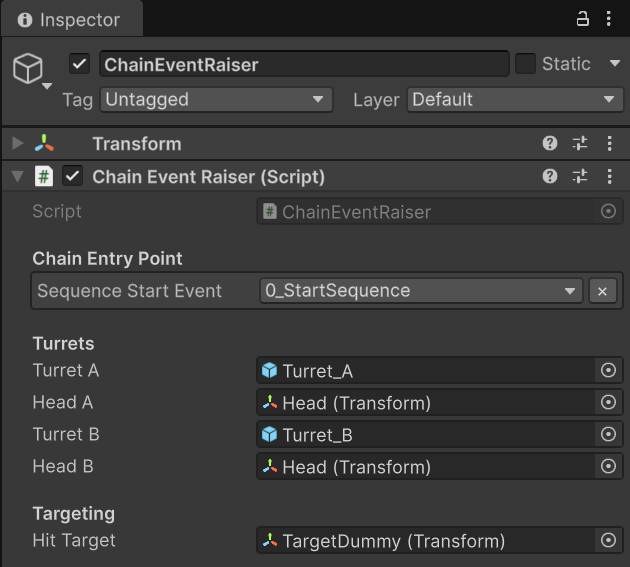
Chain Entry Point:
Sequence Start Event:0_StartSequence- Tooltip: "The Start Node of the Chain Graph"
- Only references the root—downstream is handled by graph
Turrets:
- Turret A: Turret_A (GameObject), Head A (Transform)
- Turret B: Turret_B (GameObject), Head B (Transform)
Targeting:
Hit Target: TargetDummy (Transform)
Critical Observation: Like Trigger demos, sender only knows about ONE event. The 5-step pipeline is completely abstracted into the graph.
Receiver Setup (ChainEventReceiver)
Select the ChainEventReceiver GameObject:
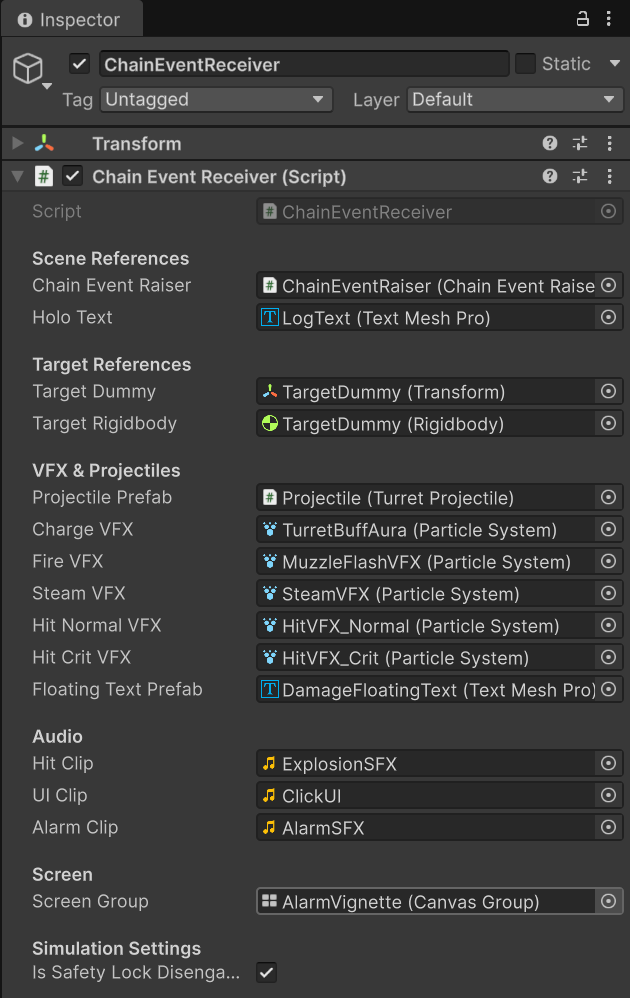
Scene References:
Chain Event Raiser: ChainEventRaiser (for unlock callbacks)Holo Text: LogText (TextMeshPro) - displays lock status
Target References:
Target Dummy,Target Rigidbody
VFX & Projectiles:
Projectile Prefab: Projectile (TurretProjectile)Charge VFX: TurretBuffAura (Particle System) - step 2Fire VFX: MuzzleFlashVFX (Particle System) - step 3Steam VFX: SteamVFX (Particle System) - step 4Hit Normal/Crit VFX,Floating Text Prefab
Audio:
Hit Clip,UI Clip,Alarm Clip
Screen:
Screen Group: AlarmVignette (CanvasGroup) - red flash on failure
Simulation Settings:
- ✅
Is Safety Lock Disengaged: TRUE (default)- Controls whether Step 1 condition passes
- Toggle-able via "Toggle SafeLock" button
💻 Code Breakdown
📤 ChainEventRaiser.cs (Sender)
using UnityEngine;
using TinyGiants.GameEventSystem.Runtime;

public class ChainEventRaiser : MonoBehaviour
{
    [Header("Chain Entry Point")]
    [Tooltip("The Start Node of the Chain Graph.")]
    [GameEventDropdown]
    public GameEvent<GameObject, DamageInfo> sequenceStartEvent;

    [Header("Turrets")]
    public GameObject turretA;
    public GameObject turretB;
    // ... head transforms ...

    private bool _isBusyA;
    private bool _isBusyB;

    /// <summary>
    /// UI Button A: Request Launch for Turret A.
    ///
    /// CRITICAL: Only raises the ROOT event.
    /// The Chain Graph orchestrates all 5 downstream steps automatically.
    /// </summary>
    public void RequestLaunchA()
    {
        if (sequenceStartEvent == null) return;

        Debug.Log("<color=cyan>[Raiser] Requesting Launch Protocol A...</color>");
        _isBusyA = true;

        // Build the data payload
        DamageInfo info = new DamageInfo(500f, true, DamageType.Physical,
                                        hitTarget.position, "Commander");

        // THE MAGIC: Single .Raise() starts entire 5-step chain
        // Graph automatically executes:
        // 1. System Check (with condition)
        // 2. Charge (with 1s delay)
        // 3. Fire (immediate)
        // 4. Cool Down (with wait-for-completion)
        // 5. Archive (with blocked arguments)
        sequenceStartEvent.Raise(turretA, info);
    }

    /// <summary>
    /// UI Button B: Request Launch for Turret B.
    /// Same logic, different turret.
    /// </summary>
    public void RequestLaunchB()
    {
        if (sequenceStartEvent == null) return;

        Debug.Log("<color=orange>[Raiser] Requesting Launch Protocol B...</color>");
        _isBusyB = true;

        DamageInfo info = new DamageInfo(200f, false, DamageType.Physical,
                                        hitTarget.position, "Commander");
        sequenceStartEvent.Raise(turretB, info);
    }

    // Unlock methods called by receiver when sequence completes or fails
    public void UnlockTurretA() => _isBusyA = false;
    public void UnlockTurretB() => _isBusyB = false;
}
Key Points:
- 🎯 Single Event Reference - Only knows root event
- 📡 Zero Pipeline Knowledge - No idea about 5 steps
- 🔓 Unlock Callbacks - Receiver signals completion/failure
- 🎬 Maximum Decoupling - All sequence logic in graph
📥 ChainEventReceiver.cs (Listener)
using UnityEngine;
using System.Collections;

public class ChainEventReceiver : MonoBehaviour
{
    [Header("Simulation Settings")]
    [Tooltip("If TRUE, passes check. If FALSE, chain breaks at Step 1.")]
    public bool isSafetyLockDisengaged = true;

    /// <summary>
    /// Property accessed by '1_SystemCheck' Node Condition.
    ///
    /// Graph configuration: Scene Object → Property → IsSafetyCheckPassed
    ///
    /// CRITICAL: This is evaluated BEFORE the node action executes.
    /// If this returns false, the chain terminates immediately.
    /// </summary>
    public bool IsSafetyCheckPassed
    {
        get
        {
            bool result = true;

            if (!isSafetyLockDisengaged)
            {
                // FAIL PATH: Safety lock is engaged
                result = false;

                Debug.LogWarning(
                    "<color=red>[Chain Blocked] Safety Check Failed. " +
                    "Sequence stopped immediately.</color>");

                // Visual feedback for failure
                StopCoroutine(nameof(ScreenRoutine));
                if (screenGroup) StartCoroutine(ScreenRoutine());
            }

            return result;
        }
    }

    /// <summary>
    /// Toggles the safety lock status. Bind this to UI Button.
    /// </summary>
    public void ToggleSafetyLock()
    {
        if (UIClip) _audioSource.PlayOneShot(UIClip);

        isSafetyLockDisengaged = !isSafetyLockDisengaged;

        // Update UI
        string text = isSafetyLockDisengaged ? "SAFELOCK READY" : "SAFELOCK ACTIVED";
        if (holoText) holoText.text = text;

        Debug.Log($"[Chain Settings] Safety Lock Disengaged: {isSafetyLockDisengaged}");
    }

    /// <summary>
    /// [Chain Step 1] System Check
    /// Bound to '1_SystemCheck' chain node.
    ///
    /// Note: This action runs AFTER the condition passed.
    /// If condition failed, this method never executes.
    /// </summary>
    public void OnSystemCheck(GameObject sender, DamageInfo args)
    {
        bool isA = sender != null && sender.name.Contains("Turret_A");

        // If we reach here, condition passed
        // But we still handle potential edge cases
        if (!IsSafetyCheckPassed)
        {
            // Unlock turret since sequence failed
            if (isA) chainEventRaiser.UnlockTurretA();
            else chainEventRaiser.UnlockTurretB();
        }

        Debug.Log($"[Chain Step 1] {sender.name} Checking...");
    }

    /// <summary>
    /// [Chain Step 2] Charge
    /// Bound to '2_Charge' chain node with 1.0s delay.
    ///
    /// The graph pauses for 1 second BEFORE calling this method.
    /// When this executes, 1.0s has already elapsed.
    /// </summary>
    public void OnStartCharging(GameObject sender, DamageInfo args)
    {
        if (chargeVFX)
        {
            var vfx = Instantiate(chargeVFX, sender.transform.position + Vector3.up * 1.5f,
                                 Quaternion.identity);
            vfx.transform.SetParent(sender.transform);
            vfx.Play();
            Destroy(vfx.gameObject, 1.2f);
        }

        Debug.Log($"[Chain Step 2] {sender.name} Charging...");
    }

    /// <summary>
    /// [Chain Step 3] Fire
    /// Bound to '3_Fire' chain node.
    ///
    /// Spawns projectile and launches toward target.
    /// This executes immediately after Step 2 completes.
    /// </summary>
    public void OnFireWeapon(GameObject sender, DamageInfo args)
    {
        // Spawn muzzle flash
        if (fireVFX)
        {
            Vector3 spawnPos = sender.transform.position +
                             sender.transform.forward * 1.5f + Vector3.up * 1.5f;
            var vfx = Instantiate(fireVFX, spawnPos, sender.transform.rotation);
            vfx.Play();
            Destroy(vfx.gameObject, 2.0f);
        }

        // Launch projectile
        if (projectilePrefab != null)
        {
            var muzzlePos = sender.transform.Find("Head/Barrel/MuzzlePoint");
            var shell = Instantiate(projectilePrefab, muzzlePos.position,
                                   sender.transform.rotation);

            shell.Initialize(args.hitPoint, 20f, () =>
            {
                // Impact callback
                if (hitClip) _audioSource.PlayOneShot(hitClip);

                // Spawn hit VFX, floating text, apply physics...
                ParticleSystem vfxToPlay = args.isCritical ? hitCritVFX : hitNormalVFX;

                if (args.isCritical)
                    StartCoroutine(ShakeCameraRoutine(0.2f, 0.4f));

                // ... (VFX, physics, text logic) ...
            });
        }

        Debug.Log($"[Chain Step 3] {sender.name} FIRED payload: {args.amount}");
    }

    /// <summary>
    /// [Chain Step 4] Cool Down
    /// Bound to '4_CoolDown' chain node with WaitForCompletion.
    ///
    /// The graph waits for this coroutine to finish before proceeding to Step 5.
    /// Unlike delay (fixed time), this waits for actual task completion.
    /// </summary>
    public void OnCoolDown(GameObject sender, DamageInfo args)
    {
        if (steamVFX)
        {
            var vfx = Instantiate(steamVFX, sender.transform.position + Vector3.up,
                                 Quaternion.Euler(-90, 0, 0));
            vfx.Play();
            Destroy(vfx.gameObject, 2.0f);
        }

        Debug.Log($"[Chain Step 4] {sender.name} Cooldowning.");
    }

    /// <summary>
    /// [Chain Step 5] Archive
    /// Bound to '5_Archive' chain node with PassArgument = FALSE.
    ///
    /// CRITICAL: Even though previous steps passed full DamageInfo,
    /// this node receives DEFAULT/NULL values due to graph configuration.
    ///
    /// Demonstrates data firewall—can sanitize sensitive data at end of chain.
    /// </summary>
    public void OnSequenceArchived(GameObject sender, DamageInfo args)
    {
        bool isA = sender != null && sender.name.Contains("Turret_A");

        // Unlock turret for next use
        if (isA) chainEventRaiser.UnlockTurretA();
        else chainEventRaiser.UnlockTurretB();

        // Check if data was successfully blocked
        bool isClean = (args == null || args.amount == 0);
        string logMsg = isClean ? "<color=cyan>CLEAN</color>" : "<color=red>LEAKED</color>";

        Debug.Log($"[Chain Step 5] Archived. Data Status: {logMsg}");
    }

    private IEnumerator ScreenRoutine()
    {
        // Red alarm vignette flash animation
        int flashes = 3;
        float flashDuration = 0.5f;

        for (int i = 0; i < flashes; i++)
        {
            if (alarmClip) _audioSource.PlayOneShot(alarmClip);

            // Sine wave alpha animation
            float t = 0f;
            while (t < flashDuration)
            {
                t += Time.deltaTime;
                float alpha = Mathf.Sin((t / flashDuration) * Mathf.PI);
                screenGroup.alpha = alpha * 0.8f;
                yield return null;
            }

            screenGroup.alpha = 0f;
            yield return new WaitForSeconds(0.1f);
        }
    }
}
Key Points:
- 🎯 5 Independent Methods - Each handles one pipeline stage
- ✅ Property for Condition -
IsSafetyCheckPassedevaluated by graph - ⏱️ Timing Agnostic - Methods don't know about delays
- 🔒 Data Firewall - Step 5 receives sanitized data
- 🎬 Completion Callbacks - Unlocks turrets on success/failure
🔑 Key Takeaways
| Concept | Implementation |
|---|---|
| 🔗 Sequential Execution | Nodes execute one-by-one in strict order |
| ✅ Validation Gates | Condition nodes terminate chain if failed |
| ⏱️ Delay Nodes | Fixed-time pauses between steps |
| 🕐 Wait Nodes | Async completion waiting (not fixed time) |
| 🔒 Data Filtering | PassArgument controls data flow per node |
| 🛑 Early Termination | Failed condition stops entire chain |
| 🎯 All-or-Nothing | Chain completes fully or terminates early |
Chain Events are perfect for:
- Cutscenes - Shot 1 → Shot 2 → Shot 3 in exact order
- Weapon Sequences - Charge → Fire → Cooldown → Reload
- Tutorial Steps - Must complete step N before step N+1
- Crafting Recipes - Sequential ingredient addition
- Boss Phases - Phase transitions with validation
- Spell Casting - Channeling → Cast → Effect → Recovery
Chain vs Coroutine: Instead of writing:
IEnumerator LaunchSequence()
{
    if (!SafetyCheck()) yield break;
    Charge();
    yield return new WaitForSeconds(1.0f);
    Fire();
    yield return StartCoroutine(CoolDown());
    Archive();
}
Use a Chain Graph where:
- Timing is visible and editable by designers
- Conditions are visual checkpoints, not hidden
ifstatements - Async waits are configurable, not hardcoded
- Entire pipeline is debuggable via graph visualization
- Blocking Behavior: If Step 3 has a bug and never completes, Steps 4-5 never run
- Condition Timing: Conditions evaluate BEFORE node action—can't use action's side effects
- No Parallel Branches: Can't execute Step 2A and Step 2B simultaneously (use Trigger for that)
- Delay Stacking: Multiple delays add up—3 nodes with 1s each = 3s total wait
- Early Exit Cleanup: Always unlock resources in condition failure paths
🎯 What's Next?
You've mastered sequential chain execution. The examples series continues with more advanced patterns.
Next Chapter: Continue exploring advanced demos in 12 Multi Database
📚 Related Documentation
- Flow Graph Editor - Edit Node Flow Graph
- Node & Connector - Understand the visual language of the graph
- Node Behavior - Node configuration and conditions
- Advanced Logic Patterns - How the system executes Triggers versus Chains
- Programmatic Flow - How to Implement Process Control via FlowGraph API
- Best Practices - Architectural patterns for complex systems