03 Custom Type Event: Automated Code Generation
📋 Overview
In real games, passing a single float for damage is rarely enough. You often need to bundle data: Who attacked? Was it a crit? What damage type? Where did it hit? This demo demonstrates how to create events for custom C# classes and leverage the automatic code generation system to maintain type safety.
- How to create events with custom data classes
- How the system auto-generates
GameEvent<T>for your types - How to pass complex data structures through events
- How one event payload can drive multiple feedback systems
🎬 Demo Scene
Assets/TinyGiants/GameEventSystem/Demo/03_CustomTypeEvent/03_CustomTypeEvent.unity
Scene Composition
UI Layer (Canvas):
- 🎮 Three Attack Buttons - Located at the bottom of the screen
- "Raise (Physical Damage)" → Triggers
CustomEventRaiser.DealPhysicalDamage() - "Raise (Fire Damage)" → Triggers
CustomEventRaiser.DealFireDamage() - "Raise (Critical Strike)" → Triggers
CustomEventRaiser.DealCriticalStrike()
- "Raise (Physical Damage)" → Triggers
Game Logic Layer (Demo Scripts):
-
📤 CustomTypeEventRaiser - GameObject with the raiser script
- Holds references to 3 events:
GameEvent<DamageInfo>for Physical, Fire, and Critical attacks - Constructs
DamageInfoobjects with different properties and raises corresponding events
- Holds references to 3 events:
-
📥 CustomTypeEventReceiver - GameObject with the receiver script
- Listens to all 3 damage events through visual binding in Game Event Editor
- Parses the
DamageInfopayload to trigger appropriate visual and physics feedback
Visual Feedback Layer (Demo Objects):
- 🎯 Capsule - The damage target (dummy)
- Has Rigidbody for physics knockback
- Has Renderer for color flash effects
- 🔥 Particle Effects - Fire hit VFX spawned at impact points
- 💬 Floating Text - Damage numbers displayed above the capsule
- 🏠 Plane - Ground surface for scene context
🎮 How to Interact
Step 1: Enter Play Mode
Press the Play button in Unity.
Step 2: Test Different Attack Types
Click "Raise (Physical Damage)":
- ⚪ White color flash on capsule
- 💬 Floating text shows "10" in white
- 🎯 Small knockback force applied
- 📝 Console logs:
[Combat Log] Dealt 10 (Physical) damage. Crit: False, Attacker: Player01
Click "Raise (Fire Damage)":
- 🟠 Orange color flash on capsule
- 💬 Floating text shows randomized damage (15-25) in orange
- 🔥 Fire particle effect spawns at the hit point
- 🎯 Standard knockback force applied
- 📝 Console logs fire damage details with attacker "Player02"
Click "Raise (Critical Strike)":
- 🟣 Purple color flash on capsule
- 💬 Larger floating text shows high damage (50-80) with "!" suffix
- 📹 Camera shake effect for dramatic impact
- 🎯 Strong knockback force applied
- 📝 Console logs critical strike details with attacker "Player03"
🏗️ Scene Architecture
The Custom Data Structure
The DamageInfo class bundles all combat-related data into a single packet:
[Serializable]
public class DamageInfo
{
    public int amount;          // Damage value
    public bool isCritical;     // Critical hit flag
    public DamageType type;     // Physical, Fire, or Void
    public Vector3 hitPoint;    // Impact position for VFX spawning
    public string attacker;     // Name of damage source
}
Why Bundle Data?
- ✅ One event call passes all necessary information
- ✅ Easier to extend (add new properties without changing event signatures)
- ✅ Type-safe serialization and validation
- ✅ Clear data contract between sender and receiver
Event Definitions
Open the Game Event Editor window to see the 3 damage events:
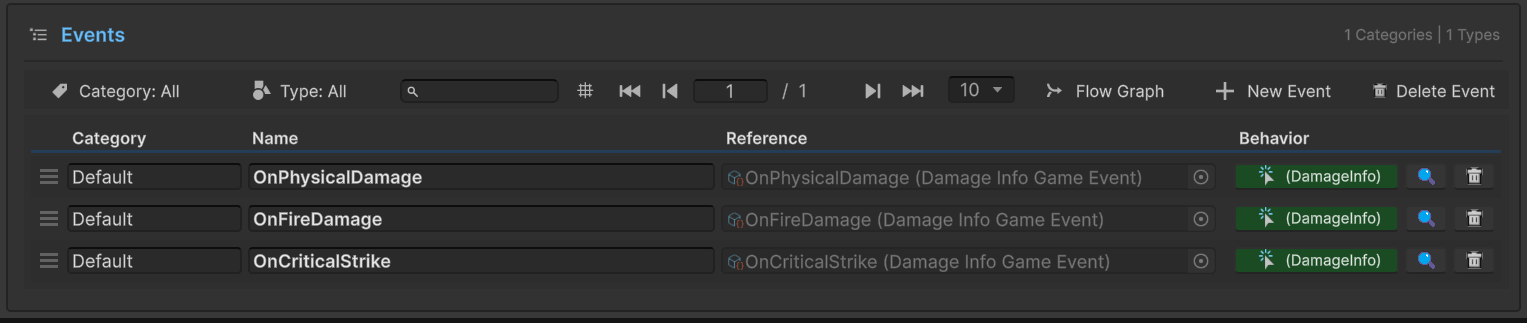
Events in Database:
| Event Name | Type | Purpose |
|---|---|---|
OnPhysicalDamage | GameEvent<DamageInfo> | Standard physical attacks |
OnFireDamage | GameEvent<DamageInfo> | Fire-based magical damage |
OnCriticalStrike | GameEvent<DamageInfo> | High-impact critical hits |
Notice the Behavior Column:
All three events show (DamageInfo) as the type indicator. These GameEvent<DamageInfo> classes were automatically generated by the plugin when you created the events—no manual coding required!
When you create an event with a custom type in the Game Event Creator, the plugin automatically:
- Generates the
GameEvent<YourType>class - Creates corresponding listener interfaces
- Ensures type safety in Inspector dropdowns and method binding
Sender Setup (CustomTypeEventRaiser)
Select the CustomTypeEventRaiser GameObject in the Hierarchy:
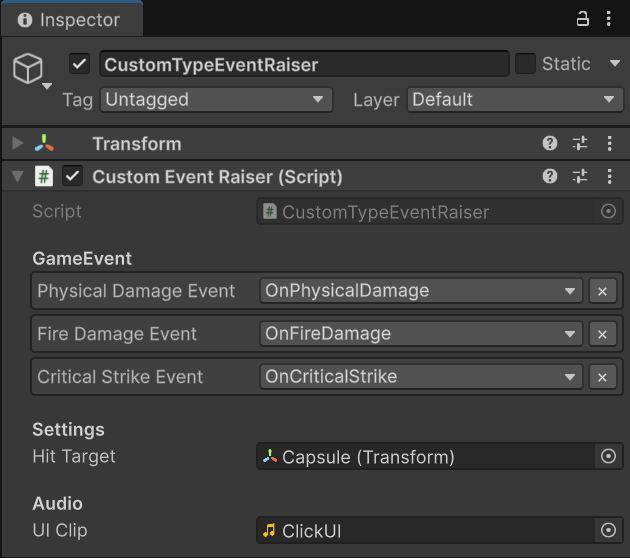
Configuration Details:
GameEvent Section:
Physical Damage Event→OnPhysicalDamageFire Damage Event→OnFireDamageCritical Strike Event→OnCriticalStrike
Settings Section:
Hit Target→ Capsule (Transform) - Used to calculate random hit points
Type Safety in Action:
- The dropdown only shows
GameEvent<DamageInfo>assets - You cannot assign a
GameEvent<string>orGameEvent<Vector3>to these slots - This prevents runtime type mismatch errors
Receiver Setup (CustomTypeEventReceiver)
Select the CustomTypeEventReceiver GameObject in the Hierarchy:
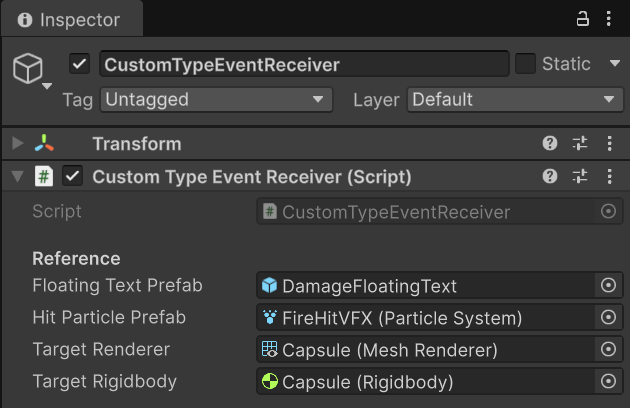
Reference Configuration:
Floating Text Prefab→ DamageFloatingText (GameObject)Hit Particle Prefab→ FireHitVFX (ParticleSystem)Target Renderer→ Capsule (Mesh Renderer)Target Rigidbody→ Capsule (Rigidbody)
Behavior Binding:
All three damage events are bound to the same receiver method through the Behavior Window:
| Event | Bound Method | Signature |
|---|---|---|
OnPhysicalDamage | OnDamageReceived | void (DamageInfo info) |
OnFireDamage | OnDamageReceived | void (DamageInfo info) |
OnCriticalStrike | OnDamageReceived | void (DamageInfo info) |
Smart Routing:
The single receiver method intelligently routes feedback based on the DamageInfo properties—checking type for fire particles, isCritical for camera shake, etc.
💻 Code Breakdown
📤 CustomTypeEventRaiser.cs (Sender)
using UnityEngine;
using TinyGiants.GameEventSystem.Runtime;

public class CustomEventRaiser : MonoBehaviour
{
    [Header("GameEvent")]
    // Notice: GameEvent<DamageInfo> was AUTO-GENERATED by the plugin
    [GameEventDropdown] public GameEvent<DamageInfo> physicalDamageEvent;
    [GameEventDropdown] public GameEvent<DamageInfo> fireDamageEvent;
    [GameEventDropdown] public GameEvent<DamageInfo> criticalStrikeEvent;

    [Header("Settings")]
    public Transform hitTarget;

    /// <summary>
    /// Simulates a standard physical attack from "Player01".
    /// Sends fixed damage with Physical type.
    /// </summary>
    public void DealPhysicalDamage()
    {
        SendDamage(physicalDamageEvent, 10f, false, DamageType.Physical, "Player01");
    }

    /// <summary>
    /// Simulates a fire spell from "Player02".
    /// Demonstrates randomized damage generation (15-25).
    /// </summary>
    public void DealFireDamage()
    {
        float dmg = Random.Range(15f, 25f);
        SendDamage(fireDamageEvent, dmg, false, DamageType.Fire, "Player02");
    }

    /// <summary>
    /// Simulates a critical strike from "Player03".
    /// Sets isCritical flag to trigger special effects (camera shake, larger text).
    /// </summary>
    public void DealCriticalStrike()
    {
        float dmg = Random.Range(50f, 80f);
        SendDamage(criticalStrikeEvent, dmg, true, DamageType.Void, "Player03");
    }

    /// <summary>
    /// Constructs the DamageInfo packet and raises the event.
    /// </summary>
    private void SendDamage(GameEvent<DamageInfo> gameEvent, float baseDamage,
                           bool isCrit, DamageType type, string attacker)
    {
        if (gameEvent == null) return;

        // Calculate random hit point to simulate impact variation
        Vector3 randomPoint = hitTarget != null
            ? hitTarget.position + Random.insideUnitSphere * 0.5f
            : Vector3.zero;

        // Construct the data packet
        DamageInfo info = new DamageInfo(
            Mathf.RoundToInt(baseDamage),
            isCrit,
            type,
            randomPoint,
            attacker
        );

        // Raise the event with the complex object
        gameEvent.Raise(info);

        Debug.Log($"[Combat Log] Dealt {info.amount} ({info.type}) damage. " +
                  $"Crit: {info.isCritical}, Attacker: {info.attacker}");
    }
}
Key Points:
- 🎯 Custom Type Support -
GameEvent<DamageInfo>handles complex objects - 🏗️ Data Construction - Build the packet with all relevant properties
- 📦 Single Call -
.Raise(info)passes the entire data structure - 🔇 Decoupling - No knowledge of what visual effects will be triggered
📥 CustomTypeEventReceiver.cs (Listener)
using UnityEngine;
using TMPro;
using System.Collections;

public class CustomTypeEventReceiver : MonoBehaviour
{
    [Header("Reference")]
    [SerializeField] private GameObject floatingTextPrefab;
    [SerializeField] private ParticleSystem hitParticlePrefab;
    [SerializeField] private Renderer targetRenderer;
    [SerializeField] private Rigidbody targetRigidbody;

    private Camera _mainCamera;

    /// <summary>
    /// Listener method for GameEvent<DamageInfo>.
    /// Parses the complex data to trigger multiple feedback systems.
    /// </summary>
    public void OnDamageReceived(DamageInfo info)
    {
        // 1. Visual: Color flash based on damage type
        Color effectColor = GetColorByType(info.type);
        StartCoroutine(FlashColorRoutine(effectColor));

        // 2. UI: Floating damage text
        if (floatingTextPrefab != null)
        {
            ShowFloatingText(info, effectColor);
        }

        // 3. VFX: Fire particles for fire damage
        if (info.type == DamageType.Fire && hitParticlePrefab != null)
        {
            Vector3 centerToHitDir = (info.hitPoint - transform.position).normalized;
            Vector3 spawnPos = info.hitPoint + (centerToHitDir * 0.2f);

            var vfxInstance = Instantiate(hitParticlePrefab, spawnPos,
                                         Quaternion.LookRotation(centerToHitDir));
            var main = vfxInstance.main;
            main.startColor = effectColor;
            vfxInstance.Play();
            Destroy(vfxInstance.gameObject, 2.0f);
        }

        // 4. Physics: Knockback force (stronger for crits)
        if (targetRigidbody != null)
        {
            Vector3 forceDir = (info.hitPoint - transform.position).normalized * -1f;
            float forceStrength = info.isCritical ? 5f : 2f;
            targetRigidbody.AddForce(forceDir * forceStrength + Vector3.up * 2f,
                                    ForceMode.Impulse);
            targetRigidbody.AddTorque(Random.insideUnitSphere * forceStrength,
                                     ForceMode.Impulse);
        }

        // 5. Camera: Screen shake for critical hits
        if (info.isCritical)
        {
            StartCoroutine(ShakeCameraRoutine(0.2f, 0.4f));
        }
    }

    private void ShowFloatingText(DamageInfo info, Color color)
    {
        GameObject go = Instantiate(floatingTextPrefab, info.hitPoint + Vector3.up,
                                   Quaternion.identity);
        var tmp = go.GetComponent<TextMeshPro>();

        if (tmp != null)
        {
            // Critical hits get "!" suffix and larger font
            tmp.text = info.isCritical ? $"{info.amount}!" : info.amount.ToString();
            tmp.color = color;
            tmp.fontSize = info.isCritical ? 10 : 6;
        }

        if (Camera.main)
            go.transform.rotation = Camera.main.transform.rotation;

        StartCoroutine(AnimateText(go.transform));
    }

    private IEnumerator FlashColorRoutine(Color color)
    {
        if (targetRenderer != null)
        {
            Color original = targetRenderer.material.color;
            targetRenderer.material.color = color * 1.5f;
            yield return new WaitForSeconds(0.1f);
            targetRenderer.material.color = original;
        }
    }

    private IEnumerator ShakeCameraRoutine(float duration, float magnitude)
    {
        if (_mainCamera == null) yield break;

        Vector3 originalPos = _mainCamera.transform.position;
        float elapsed = 0.0f;

        while (elapsed < duration)
        {
            float x = Random.Range(-1f, 1f) * magnitude;
            float y = Random.Range(-1f, 1f) * magnitude;
            _mainCamera.transform.position = originalPos + new Vector3(x, y, 0);
            elapsed += Time.deltaTime;
            yield return null;
        }

        _mainCamera.transform.position = originalPos;
    }

    private Color GetColorByType(DamageType type)
    {
        switch (type)
        {
            case DamageType.Physical: return Color.white;
            case DamageType.Fire: return new Color(1f, 0.5f, 0f);
            case DamageType.Void: return new Color(0.8f, 0f, 1f);
            default: return Color.grey;
        }
    }
}
Key Points:
- 🎯 Property-Based Routing - Check
info.typeandinfo.isCriticalto decide actions - 🎨 Multiple Feedback Systems - Color flash, floating text, VFX, physics, camera shake
- 📍 Spatial Data Usage -
info.hitPointdetermines VFX spawn location - 🔇 Decoupling - No knowledge of which button or raiser triggered the event
🔑 Key Takeaways
| Concept | Implementation |
|---|---|
| 🎯 Custom Types | GameEvent<YourClass> supports any serializable C# class |
| 🏭 Auto-Generation | Plugin generates event classes automatically—no manual coding |
| 📦 Data Bundling | Pass complex objects with multiple properties in one call |
| 🔀 Smart Routing | Single receiver method can handle different logic paths based on data |
| 🎨 Rich Feedback | One event payload drives multiple coordinated systems |
Custom type events are perfect for complex game systems like combat, dialogue, or inventory. Instead of firing 5 separate events (OnDamage, OnDamageType, OnCritical, etc.), you fire one event with all the data, keeping your event system clean and efficient!
🎯 What's Next?
You've mastered custom data types. Now let's explore how to add custom sender information to track event sources.
Next Chapter: Learn about sender tracking in 04 Custom Sender Event
📚 Related Documentation
- Game Event Creator - How to create events with custom types
- Code Generation - Understanding the automatic code generation system
- API Reference - Generic event API for custom types