06 Conditional Event: Visual Logic Builder
📋 Overview
Usually, checking if a door should open requires code like: if (powerOn && (isAdmin || isLucky)). This demo demonstrates the Visual Condition Tree Builder, which lets you create complex, nested validation rules directly in the Editor—removing the need for if/else checks in your scripts.
- How to build complex logic trees without code
- How to reference scene objects in conditions
- How to use AND/OR groups for branching logic
- How conditions act as gatekeepers for event callbacks
🎬 Demo Scene
Assets/TinyGiants/GameEventSystem/Demo/06_ConditionalEvent/06_ConditionalEvent.unity
Scene Composition
UI Layer (Canvas):
-
🎮 Power Toggle Button - Top left corner
- "Toggle Power (On)" / "Toggle Power (Off)"
- Triggers
ConditionalEventRaiser.TogglePower() - Controls the global
SecurityGrid.IsPowerOnstate
-
🎮 Four Access Card Buttons - Bottom of screen
- "Swipe GuestCard" →
ConditionalEventRaiser.SwipeGuestCard()(Level 1, Visitor dept) - "Swipe StaffCard" →
ConditionalEventRaiser.SwipeStaffCard()(Level 3, Management dept) - "Swipe AdminCard" →
ConditionalEventRaiser.SwipeAdminCard()(Level 5, Director dept) - "Attempt Hacking" →
ConditionalEventRaiser.AttemptHacking()(Level 0, DarkWeb dept)
- "Swipe GuestCard" →
Game Logic Layer (Demo Scripts):
-
📤 ConditionalEventRaiser - GameObject with the raiser script
- Constructs
AccessCardobjects with different credentials - Raises
OnAccessCardevent for validation - Has NO validation logic—just passes data
- Constructs
-
📥 ConditionalEventReceiver - GameObject with the receiver script
- Contains
OpenVault()method with ZERO conditional logic - Simply plays door animation when called
- Assumes if called, all conditions passed
- Contains
-
🔌 SecurityGrid - Scene object holding system state
- Public property:
IsPowerOn(bool) - Condition tree reads this value directly from scene instance
- Public property:
Visual Feedback Layer (Demo Objects):
- 🚪 VaultDoorSystem - Massive double doors
- Left and right doors slide open/closed
- Status text displays: "LOCKED" / "ACCESS GRANTED" / "CLOSING..."
- Steam VFX plays when doors open
- 💡 Power Indicator - Green sphere light
- Glows when power is ON
- Dims when power is OFF
- 🖼️ Screen Vignette - Fullscreen overlay
- Green flash when power turns ON
- Red flash when power turns OFF
🎮 How to Interact
The Logic Gate Challenge
The vault opens ONLY IF this condition evaluates to true:
[⚡ Power ON] AND ([🏅 Admin] Level OR [🏷️ Valid Department] OR [🎲 Lucky Hacker])
Step 1: Enter Play Mode
Press the Play button in Unity. The vault should show "LOCKED" in red.
Step 2: Test with Power ON (Correct Setup)
Ensure Power is ON:
- Look at the top-left button: Should show "Toggle Power (On)"
- Look at the power indicator (green sphere): Should be glowing
- Screen vignette flashes green when toggled ON
Click "Swipe StaffCard":
- Credentials: Level 3, Department "Management"
- Logic Path:
- ✅ Power ON → Pass
- ❌ Level 3 < 4 → Fail (Admin check)
- ✅ Department "Management" is in whitelist → Pass
- Result: One branch passed in OR group
- Outcome: 🟢 ACCESS GRANTED
- Status text turns green
- Steam VFX erupts from door base
- Doors slide open smoothly
- Doors close after 2 seconds
- Console:
[Vault] ACCESS GRANTED to Staff_Alice. Opening doors.
Click "Swipe AdminCard":
- Credentials: Level 5, Department "Director"
- Logic Path:
- ✅ Power ON → Pass
- ✅ Level 5 >= 4 → Pass (Admin check succeeds immediately)
- Result: First condition in OR group passed
- Outcome: 🟢 ACCESS GRANTED
Click "Swipe GuestCard":
- Credentials: Level 1, Department "Visitor"
- Logic Path:
- ✅ Power ON → Pass
- ❌ Level 1 < 4 → Fail (Admin check)
- ❌ Department "Visitor" not in whitelist → Fail
- 🎲 Random(0-100) > 70 in nested AND group → ~30% chance
- Result: Most likely all branches fail
- Outcome: 🔴 LOCKED (90% of the time)
- Vault remains closed
- Status text stays red
- Console: (No receiver log because condition failed)
Step 3: Test with Power OFF (Failure Case)
Click "Toggle Power" (Turn OFF):
- Button text changes to "Toggle Power (Off)"
- Power indicator dims
- Screen vignette flashes RED
Click "Swipe AdminCard":
- Credentials: Level 5 (Admin level)
- Logic Path:
- ❌ Power OFF → Fail at root AND condition
- Evaluation stops immediately (short-circuit)
- Outcome: 🔴 LOCKED
- Even admins cannot bypass the power requirement
- Receiver method is NEVER called
- Console:
[Terminal] Scanning...(but no vault log)
The AND logic at the root ensures that no credential can bypass the power requirement. This demonstrates how condition trees can enforce hard requirements.
🏗️ Scene Architecture
The Condition Tree Structure
The vault's access logic is implemented as a visual tree in the Behavior Window:
🟦 ROOT (AND) ➔ Must pass BOTH major branches
│
├─ ⚡ SecurityGrid.IsPowerOn == true      ➔ [Power Status Check]
│
└─ 🟧 Branch 2 (OR) ➔ Must pass AT LEAST ONE below
   │
   ├─ 🏅 Arg.securityLevel >= 4          ➔ [High Clearance]
   ├─ 🏷️ Arg.department ∈ [Mgmt, IT]     ➔ [Dept. Validation]
   ├─ 🎲 Random(0-100) > 90              ➔ [10% Luck Pass]
   │
   └─ 🟦 Nested Group (AND) ➔ Combined low-level check
      ├─ 🔢 Arg.securityLevel >= 1       ➔ [Basic Access]
      └─ 🎲 Random(0-100) > 70           ➔ [30% Luck Pass]
Event Definition

| Event Name | Type | Purpose |
|---|---|---|
OnAccessCard | GameEvent<AccessCard> | Validates card credentials through condition tree |
The AccessCard Data Structure:
[System.Serializable]
public class AccessCard
{
    public string holderName;        // "Staff_Alice", "Admin_Root", etc.
    public int securityLevel;        // 1=Guest, 3=Staff, 5=Admin
    public string department;        // "Management", "IT", "Visitor", etc.
}
Behavior Configuration with Condition Tree
Click the (AccessCard) icon in the Behavior column to open the Behavior Window:
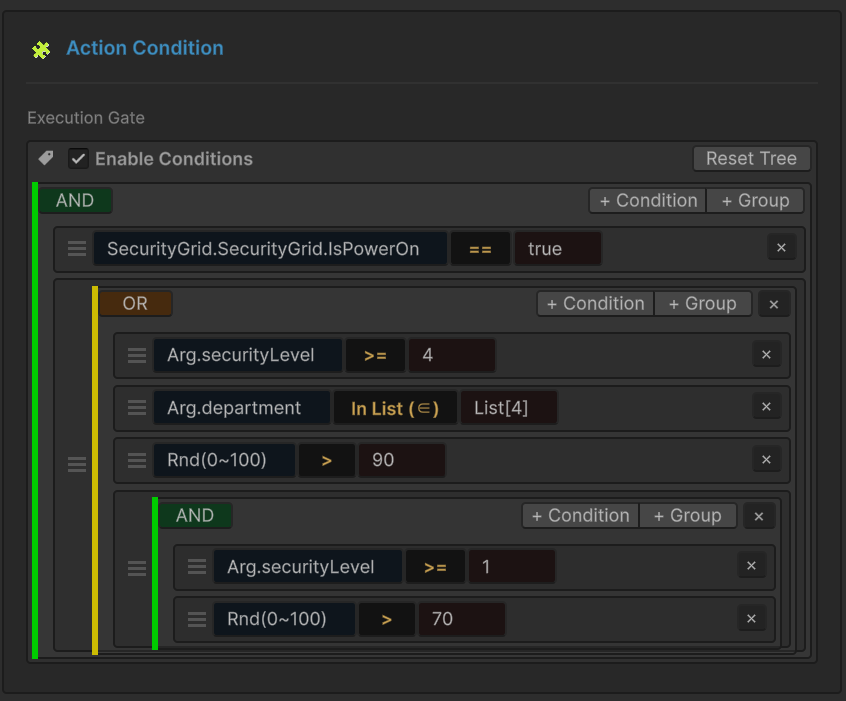
Root AND Group:
- Condition 1: Scene Object Reference
- Source:
SecurityGridGameObject in scene - Property:
IsPowerOn(bool) - Operator:
==(Equals) - Target:
true - Purpose: Hard requirement—power must be ON
- Source:
Nested OR Group: The OR group provides multiple valid paths to access:
-
Condition A: Event Argument Check
- Source:
Arg.securityLevel(int from AccessCard) - Operator:
>=(Greater Or Equal) - Target:
4 - Purpose: Admin-level credentials
- Source:
-
Condition B: List Membership Check
- Source:
Arg.department(string from AccessCard) - Operator:
In List(Contained In) - Target: Constant List
["Management", "IT"] - Purpose: Whitelisted departments
- Source:
-
Condition C: Random Chance
- Source:
Random Value(0-100 range) - Operator:
>(Greater) - Target:
90 - Purpose: 10% lucky bypass for hackers
- Source:
-
Nested AND Group: Guest Access Logic
- Sub-condition 1:
Arg.securityLevel >= 1(Valid card) - Sub-condition 2:
Random(0-100) > 70(30% chance) - Purpose: Guests have lower chance but must have valid card
- Sub-condition 1:
You can build this tree visually in the Behavior Window:
- Click "+ Condition" to add individual checks
- Click "+ Group" to add AND/OR containers
- Drag the
≡handle to reorder conditions - Switch between AND/OR logic by clicking the group label
Sender Setup (ConditionalEventRaiser)
Select the ConditionalEventRaiser GameObject:
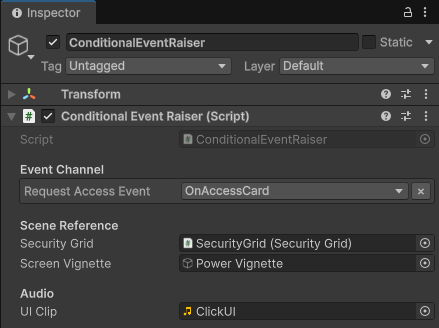
Event Channel:
Request Access Event:OnAccessCard
Scene Reference:
Security Grid: SecurityGrid GameObject (for power toggle functionality)Screen Vignette: UI overlay for visual power feedback
How Cards Work:
// Guest Card (Relies on luck)
SwipeGuestCard() → AccessCard("Guest_Bob", 1, "Visitor")

// Staff Card (Valid department)
SwipeStaffCard() → AccessCard("Staff_Alice", 3, "Management")

// Admin Card (High level)
SwipeAdminCard() → AccessCard("Admin_Root", 5, "Director")

// Hacker (Pure randomness)
AttemptHacking() → AccessCard("Unknown_Hacker", 0, "DarkWeb")
Receiver Setup (ConditionalEventReceiver)
Select the ConditionalEventReceiver GameObject:
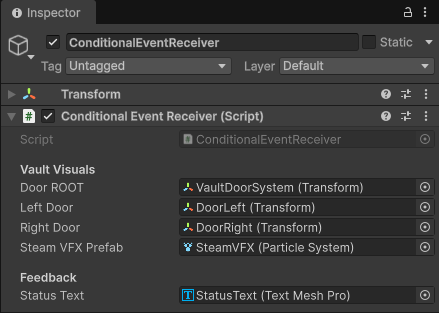
Vault Visuals:
Door ROOT: VaultDoorSystem (Transform)Left Door: DoorLeft (Transform) - slides left when openingRight Door: DoorRight (Transform) - slides right when openingSteam VFX Prefab: Particle system for door opening effect
Feedback:
Status Text: StatusText (TextMeshPro) - displays access status
Behavior Binding:
- Event:
OnAccessCard - Method:
ConditionalEventReceiver.OpenVault(AccessCard card) - Condition Tree: Acts as gatekeeper (configured above)
The OpenVault() method contains NO conditional checks. It's called only if the condition tree evaluates to true. This separates validation logic (data layer) from action logic (behavior layer).
💻 Code Breakdown
📤 ConditionalEventRaiser.cs (Sender)
using UnityEngine;
using TinyGiants.GameEventSystem.Runtime;

public class ConditionalEventRaiser : MonoBehaviour
{
    [Header("Event Channel")]
    [GameEventDropdown] public GameEvent<AccessCard> requestAccessEvent;

    [Header("Scene Reference")]
    [SerializeField] private SecurityGrid securityGrid;

    public void SwipeGuestCard()
    {
        // Level 1, Dept "Visitor"
        // Fails level check, fails dept check
        // Relies on Random > 70 in nested AND group (~30% chance)
        SendRequest("Guest_Bob", 1, "Visitor");
    }

    public void SwipeStaffCard()
    {
        // Level 3, Dept "Management"
        // Fails level check (3 < 4)
        // Passes department check (Management is whitelisted)
        SendRequest("Staff_Alice", 3, "Management");
    }

    public void SwipeAdminCard()
    {
        // Level 5
        // Passes level check immediately (5 >= 4)
        SendRequest("Admin_Root", 5, "Director");
    }

    public void AttemptHacking()
    {
        // Level 0
        // Pure reliance on Random > 90 (10% chance)
        SendRequest("Unknown_Hacker", 0, "DarkWeb");
    }

    private void SendRequest(string name, int level, string dept)
    {
        if (requestAccessEvent == null) return;

        // Construct the data packet
        AccessCard card = new AccessCard(name, level, dept);

        // Raise the event
        // The condition tree evaluates BEFORE calling the receiver
        requestAccessEvent.Raise(card);

        Debug.Log($"[Terminal] Scanning... Name: {name} | Lv: {level} | Dept: {dept}");
    }
}
Key Points:
- 🎯 No Validation - Sender just creates data and raises event
- 📦 Data Construction - Each button creates a unique credential profile
- 🔇 Zero Logic - No knowledge of what conditions must be met
📥 ConditionalEventReceiver.cs (Listener)
using UnityEngine;
using TMPro;
using System.Collections;

public class ConditionalEventReceiver : MonoBehaviour
{
    [Header("Vault Visuals")]
    [SerializeField] private Transform doorROOT;
    [SerializeField] private Transform leftDoor;
    [SerializeField] private Transform rightDoor;
    [SerializeField] private ParticleSystem steamVFXPrefab;

    [Header("Feedback")]
    [SerializeField] private TextMeshPro statusText;

    private Vector3 _leftClosedPos;
    private Vector3 _rightClosedPos;

    private void Start()
    {
        // Store closed positions for animation
        if(leftDoor) _leftClosedPos = leftDoor.localPosition;
        if(rightDoor) _rightClosedPos = rightDoor.localPosition;

        UpdateStatusText("LOCKED", Color.red);
    }

    /// <summary>
    /// [Event Callback - Condition Gated]
    ///
    /// CRITICAL: This method contains NO validation logic!
    ///
    /// The GameEvent Condition Tree acts as the gatekeeper.
    /// If this method executes, it means ALL conditions evaluated to TRUE:
    /// - Power is ON
    /// - AND at least one of: Admin level, Valid dept, or Lucky random
    ///
    /// This separation allows designers to modify access rules in the Editor
    /// without touching code.
    /// </summary>
    public void OpenVault(AccessCard card)
    {
        if (_isOpen) return;

        Debug.Log($"<color=green>[Vault] ACCESS GRANTED to {card.holderName}. " +
                  "Opening doors.</color>");

        StartCoroutine(OpenSequenceRoutine(card.holderName));
    }

    private IEnumerator OpenSequenceRoutine(string name)
    {
        _isOpen = true;
        UpdateStatusText("ACCESS GRANTED", Color.green);

        // Spawn steam VFX
        if (doorROOT != null && steamVFXPrefab != null)
        {
            Vector3 spawnPos = doorROOT.position;
            spawnPos.y -= 2.6f;

            var vfxInstance = Instantiate(steamVFXPrefab, spawnPos, Quaternion.identity);
            vfxInstance.Play();
            Destroy(vfxInstance.gameObject, 2.0f);
        }

        // Open doors (slide outward)
        float t = 0;
        while(t < 1f)
        {
            t += Time.deltaTime * 2f;
            if(leftDoor)
                leftDoor.localPosition = Vector3.Lerp(_leftClosedPos,
                                                      _leftClosedPos + Vector3.left * 1.2f, t);
            if(rightDoor)
                rightDoor.localPosition = Vector3.Lerp(_rightClosedPos,
                                                       _rightClosedPos + Vector3.right * 1.2f, t);
            yield return null;
        }

        yield return new WaitForSeconds(2.0f);
        UpdateStatusText("CLOSING...", Color.yellow);

        // Close doors (slide back)
        t = 0;
        while(t < 1f)
        {
            t += Time.deltaTime * 2f;
            if(leftDoor)
                leftDoor.localPosition = Vector3.Lerp(_leftClosedPos + Vector3.left * 1.2f,
                                                      _leftClosedPos, t);
            if(rightDoor)
                rightDoor.localPosition = Vector3.Lerp(_rightClosedPos + Vector3.right * 1.2f,
                                                       _rightClosedPos, t);
            yield return null;
        }

        _isOpen = false;
        UpdateStatusText("LOCKED", Color.red);
    }

    private void UpdateStatusText(string text, Color col)
    {
        if (statusText)
        {
            statusText.text = text;
            statusText.color = col;
        }
    }
}
Key Points:
- 🎯 Zero Conditional Logic - No
ifstatements checking credentials - 🔓 Trust-Based Execution - If called, all conditions already passed
- 🎨 Pure Presentation - Just plays door animation and VFX
- 🏗️ Separation of Concerns - Validation (data) vs Action (behavior)
🔌 SecurityGrid.cs (Scene State)
using UnityEngine;

public class SecurityGrid : MonoBehaviour
{
    // This public property is read by the condition tree
    public bool IsPowerOn = true;

    public void TogglePower()
    {
        IsPowerOn = !IsPowerOn;

        // Update visuals...
        Debug.Log($"[Environment] Power System is now: {(IsPowerOn ? "ONLINE" : "OFFLINE")}");
    }
}
Key Points:
- 🔌 Public State -
IsPowerOnis accessible to condition tree - 📍 Scene Object - Condition references this specific GameObject instance
- 🎮 Runtime Changes - Toggling power immediately affects condition evaluation
🔑 Key Takeaways
| Concept | Implementation |
|---|---|
| 🎯 Visual Logic | Build complex conditions without writing code |
| 🌳 Tree Structure | AND/OR groups allow nested branching logic |
| 📍 Scene References | Read properties directly from GameObjects in the scene |
| 🎲 Random Conditions | Built-in random value source for chance-based logic |
| 🔀 Argument Access | Reference event data properties in conditions |
| 🚪 Gatekeeper Pattern | Conditions control whether callbacks execute |
The Visual Condition Tree is perfect for:
- Access control systems - Doors, terminals, restricted areas
- Quest requirements - Check multiple conditions before quest completion
- Buff activation - Only apply effects if prerequisites met
- AI behavior - Decision trees for enemy reactions
- Loot systems - Validate drop conditions (level, luck, location)
By moving logic into data (the condition tree asset), you enable designers to tune gameplay rules without programmer intervention!
🎯 What's Next?
You've mastered conditional logic. Now let's explore time-based event control with delays and scheduling.
Next Chapter: Learn about delayed execution in 07 Delayed Event
📚 Related Documentation
- Visual Condition Tree - Complete guide to condition builder
- Game Event Behavior - How to configure action conditions
- Best Practices - Patterns for data-driven design