12 Multi Database: Modular Event Architecture
📋 Overview
In large-scale projects with hundreds of events (RPGs, MMOs, complex simulations), storing all events in a single monolithic database asset becomes a maintenance nightmare—slow Editor performance, Git merge conflicts, and poor organization. The Multi-Database System solves this by allowing you to split events across multiple modular ScriptableObject assets (e.g., Core_DB, Combat_DB, UI_DB), each managed independently.
- How to create and manage multiple event databases
- How the Manager merges databases at runtime with zero performance cost
- How Flow Graphs seamlessly connect events across different databases
- Organizational strategies for team collaboration and version control
🎬 Demo Scene
Assets/TinyGiants/GameEventSystem/Demo/12_MultiDatabase/12_MultiDatabase.unity
What This Demo Demonstrates
This demo reuses the exact Chain Event logic from Demo 11 (the 5-step Launch Protocol), but with a critical architectural difference:
Demo 11: All 6 events stored in GameEventDatabase_Chain.asset (single file)
Demo 12: Same 6 events distributed across 3 separate database files:
GameEventDatabase_Core.asset- Logic flow eventsGameEventDatabase_Combat.asset- Action & VFX eventsGameEventDatabase_System.asset- Utility & cleanup events
The Result: Identical runtime behavior, but modular organization for better scalability.
🗂️ Database Architecture
Physical Asset Structure
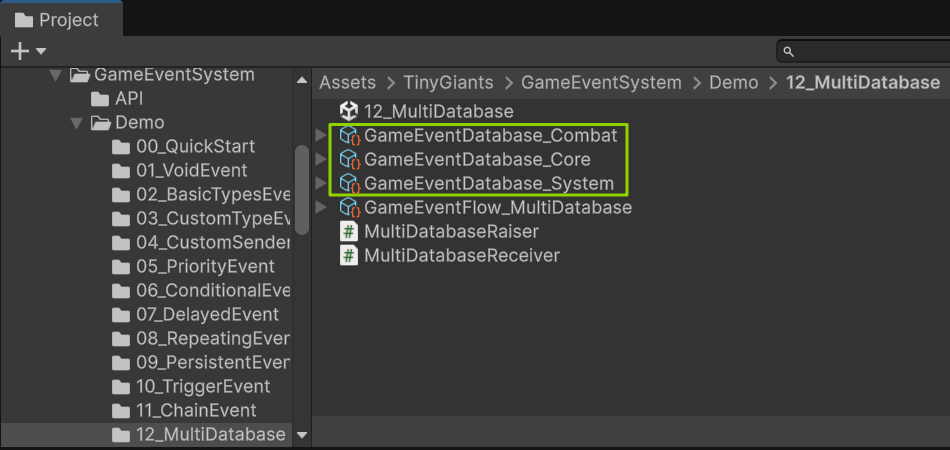
In Project Window:
📂 12_MultiDatabase/
│
├── 🧠 GameEventDatabase_Core.asset      ➔ [ 📦 2 Events ]
│   ├── 🎬 0_StartSequence               ➔ Intro logic
│   └── ⚙️ 1_SystemCheck                 ➔ Initialization
│
├── ⚔️ GameEventDatabase_Combat.asset    ➔ [ 📦 2 Events ]
│   ├── ⚡ 2_Charge                      ➔ Skill initiation
│   └── 🔥 3_Fire                        ➔ Projectile logic
│
├── 🛠️ GameEventDatabase_System.asset    ➔ [ 📦 2 Events ]
│   ├── ⏳ 4_CoolDown                    ➔ Global timers
│   └── 📁 5_Archive                     ➔ Persistence/Save
│
└── 🕸️ GameEventFlow_MultiDatabase.asset ➔ [ 🌐 Flow Graph ]
    └─ (Connects events across all databases listed above)
Key Observation:
Each database is a ScriptableObject asset—a physical .asset file in your project. You can:
- Move them to different folders
- Assign them to different team members (no merge conflicts!)
- Load/unload them dynamically at runtime
- Version control them independently
Event databases are ScriptableObjects, meaning they:
- Exist as
.assetfiles in your project - Can be referenced in scenes
- Survive domain reloads
- Are serialized independently
This is fundamentally different from systems that store events in a single JSON config or embedded in scenes.
🎮 How to Interact
Runtime Behavior Test
The scene is visually identical to Demo 11. Same turrets, same buttons, same launch sequence.
Step 1: Enter Play Mode
Step 2: Test Normal Launch
- Click "Launch A"
- Observe: Full 5-step sequence executes perfectly
- System Check → Charge (1s delay) → Fire → CoolDown → Archive
- Behind the Scenes: Execution jumps across 3 databases:
- Step 1 (
SystemCheck) fromCoreDB - Step 3 (
Fire) fromCombatDB - Step 5 (
Archive) fromSystemDB
- Step 1 (
Result: ✅ Seamless cross-database execution
Database Loading Verification
This test proves the modular loading system works:
Step 3: Disable Combat Database
- Select Game Event Manager in Hierarchy
- Expand Databases list in Inspector
- Find
GameEventDatabase_Combatentry - Uncheck the "Active" toggle
Step 4: Test Disabled Database
- Click "Launch A"
- Result: ❌ Sequence hangs at Step 2 (Charge)
- Console shows errors about missing events
- Steps 3-5 never execute
Step 5: Re-Enable Combat Database
- Check the "Active" toggle again
- Click "Launch A"
- Result: ✅ Sequence works again
What This Proves:
- Databases can be dynamically enabled/disabled at runtime
- Missing databases break execution (as expected)
- No "auto-reload" magic—you control what's loaded
🏗️ Multi-Database Configuration
Runtime: Manager Setup
Select Game Event Manager in Hierarchy to see the multi-database configuration:
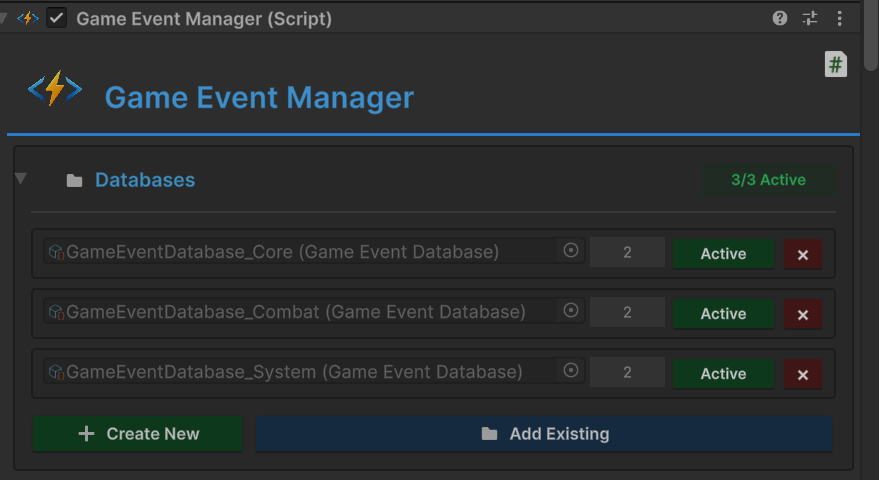
Databases List (3 entries):
- ✅
GameEventDatabase_Core- Active - ✅
GameEventDatabase_Combat- Active - ✅
GameEventDatabase_System- Active
How Runtime Merging Works:
🚀 System Initiation
│
├── 📂 Stage 1: Discovery
│   └── 📚 Manager scans & reads all Active Databases
│
├── 🧩 Stage 2: Consolidation
│   └── 🛠️ Merges all events into a Global Lookup Table (LUT)
│       ├── 🧬 Key:   Event GUID (Unique Identifier)
│       └── 📦 Value: Event Reference (Direct Pointer)
│
└── 🔗 Stage 3: Linking
    └── 🕸️ FlowGraph references resolved via GUID
Performance Characteristics:
- Lookup Speed: O(1) - same as single database
- Memory Overhead: Negligible (just dictionary pointers)
- Initialization: Databases merged once at startup
- Runtime Cost: None - already merged
Having 1 database or 100 databases makes no runtime difference. The Manager merges them into a single lookup table at startup. Choose database count based on organization needs, not performance concerns.
Design Time: Editor Database Switching
Open Game Event Editor to manage events across databases:
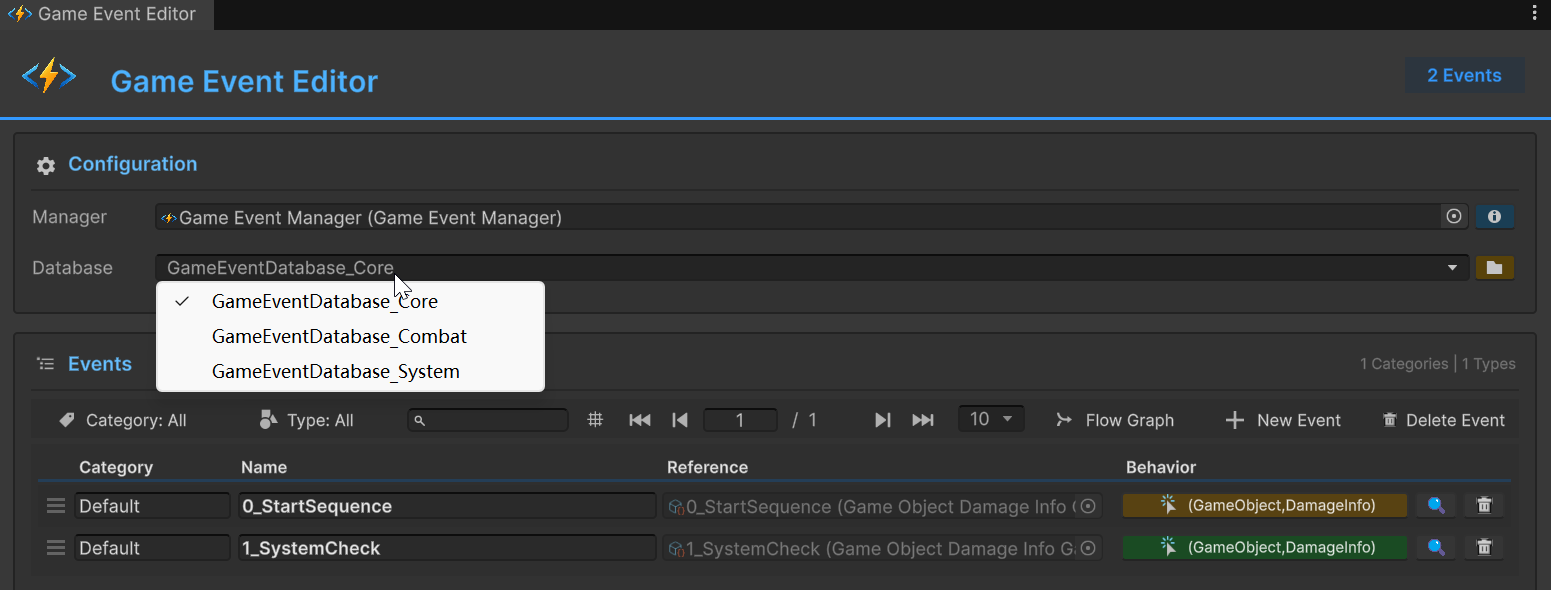
Database Dropdown (Toolbar): Shows all available databases:
GameEventDatabase_Core(selected)GameEventDatabase_CombatGameEventDatabase_System
Workflow:
- Select Database: Choose which database to edit
- View Events: Editor shows only events from selected database
- Create Events: New events go into currently selected database
- Switch Context: Dropdown allows quick navigation
Example - Viewing Core Database:
- Dropdown:
GameEventDatabase_Core - Events Shown:
0_StartSequence,1_SystemCheck(2 total) - Events Hidden: All events from other databases
Example - Viewing Combat Database:
- Dropdown:
GameEventDatabase_Combat - Events Shown:
2_Charge,3_Fire(2 total) - Events Hidden: All events from other databases
The Editor shows one database at a time to reduce visual clutter. Use the dropdown to switch between databases. This doesn't affect runtime—all active databases are still merged.
Inspector: Cross-Database Event Selection
When assigning events to scripts in Inspector, the GameEventDropdown shows events from all active databases:
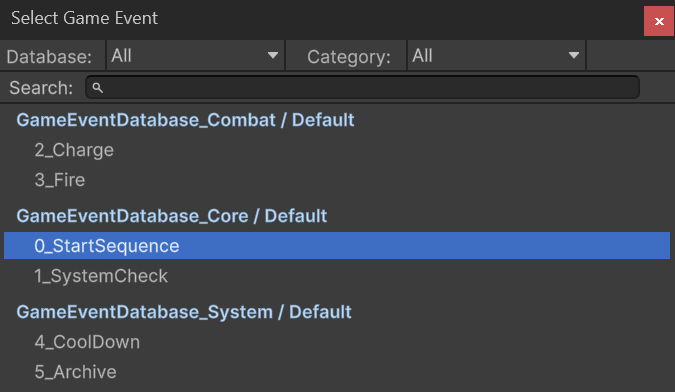
Dropdown Structure: Events grouped by database and category:
⚔️ GameEventDatabase_Combat / Default
├─ ⚡ 2_Charge
└─ ⚡ 3_Fire

🧠 GameEventDatabase_Core / Default
├─ 📍 🎬 0_StartSequence        ➔ [ CURRENTLY SELECTED ]
└─ ⚙️ 1_SystemCheck

🛠️ GameEventDatabase_System / Default
├─ ⏳ 4_CoolDown
└─ 💾 5_Archive
Key Behaviors:
- All Active Databases: Dropdown includes events from every database loaded by Manager
- Database Labels: Events prefixed with database name for clarity
- Category Grouping: Events organized by category within each database
- Type Filtering: Only shows events matching field's type signature
Example Assignment:
[GameEventDropdown]
public GameEvent<GameObject, DamageInfo> sequenceStartEvent;
Dropdown shows:
- ✅
0_StartSequence(from Core DB) - Compatible type - ❌ Other events hidden if type doesn't match
The dropdown automatically filters by:
- Type compatibility - Only shows events matching field type
- Active databases - Only shows events from databases loaded by Manager
- Database/Category - Groups for easy navigation
This prevents type errors and makes large projects navigable.
🔑 Multi-Database Benefits
Team Collaboration
Problem: 10 developers all editing GlobalDatabase.asset
- Constant Git merge conflicts
- Long Editor freezes when loading
- Unclear ownership
Solution: Module-based database ownership
📂 Databases/
│
├── 🧠 Core_DB.asset         ➔ 💻 [ Owner: Lead Programmer ]
│   └─ Global states, initialization, & low-level triggers.
│
├── ⚔️ Combat_DB.asset       ➔ 🤺 [ Owner: Combat Team ]
│   └─ Attack sequences, AI behaviors, & damage logic.
│
├── 🖥️ UI_DB.asset           ➔ 🎨 [ Owner: UI Team ]
│   └─ Menu transitions, HUD updates, & button feedback.
│
├── 🔊 Audio_DB.asset        ➔ 🎧 [ Owner: Audio Team ]
│   └─ Ambient loops, SFX triggers, & music state switches.
│
├── 🗺️ Level1_DB.asset       ➔ 📐 [ Owner: Level Designer A ]
│   └─ Puzzles, triggers, and events specific to Level 1.
│
└── 🗺️ Level2_DB.asset       ➔ 📐 [ Owner: Level Designer B ]
    └─ Puzzles, triggers, and events specific to Level 2.
Result:
- ✅ Parallel work without conflicts
- ✅ Clear module ownership
- ✅ Faster Git operations (smaller diffs)
- ✅ Easier code reviews (smaller changesets)
Logical Organization
Problem: 500 events in one database
- Hard to find specific events
- No clear boundaries between systems
- Difficult to understand dependencies
Solution: Domain-driven database design
⚔️ Combat_DB             ➔ [ 50 Events ]
   └─ Attack, defense, & high-frequency damage logic.

🏃 Movement_DB           ➔ [ 30 Events ]
   └─ Walk, jump, dash, & physics-based state changes.

🎒 Inventory_DB          ➔ [ 80 Events ]
   └─ Pick up, use, drop, & item-durability mechanics.

📜 Quest_DB              ➔ [ 100 Events ]
   └─ Start, progress, & complex completion milestones.

🖥️ UI_DB                 ➔ [ 70 Events ]
   └─ Menu transitions, HUD updates, & dialog systems.

🔊 Audio_DB              ➔ [ 40 Events ]
   └─ Dynamic music layers & localized SFX triggers.

🗺️ Level_Specific_DB     ➔ [ 130 Events ]
   └─ Per-level unique environmental & puzzle events.
Result:
- ✅ Clear conceptual boundaries
- ✅ Easy to locate relevant events
- ✅ Understandable dependencies
- ✅ Modular testing (load only needed DBs)
Dynamic Loading
Use Case: Mobile game with multiple levels
Problem: Loading all 1000 events at startup wastes memory
Solution: Runtime database management
void LoadLevel(int levelIndex)
{
    // Unload previous level's events
    manager.UnloadDatabase("Level" + (levelIndex - 1));

    // Load current level's events
    manager.LoadDatabase("Level" + levelIndex);

    // Keep core systems always loaded
    // (Core_DB, Combat_DB, UI_DB remain active)
}
Result:
- ✅ Lower memory footprint
- ✅ Faster level transitions
- ✅ Better performance on low-end devices
- ✅ Modular content updates (patch single DB)
🛠️ Code Architecture
Location-Agnostic Code
The code for Demo 12 is identical to Demo 11. Scripts don't know or care which database an event lives in:
MultidatabaseRaiser.cs:
[GameEventDropdown]
public GameEvent<GameObject, DamageInfo> sequenceStartEvent;

public void RequestLaunchA()
{
    // Works regardless of which database contains this event
    // Could be Core_DB, Combat_DB, or any other database
    sequenceStartEvent.Raise(turretA, info);
}
MultidatabaseReceiver.cs:
// Methods bound to events from different databases
public void OnSystemCheck(GameObject sender, DamageInfo args)    // Core_DB
public void OnStartCharging(GameObject sender, DamageInfo args)  // Combat_DB
public void OnFireWeapon(GameObject sender, DamageInfo args)     // Combat_DB
public void OnCoolDown(GameObject sender, DamageInfo args)       // System_DB
public void OnSequenceArchived(GameObject sender, DamageInfo args) // System_DB
Key Insight: Scripts reference events by GUID (stored in serialized field), not by database path. The Manager resolves GUIDs to event instances at runtime, regardless of which database contains them.
Flow Graph Cross-Database Connections
The Flow Graph connects events from different databases seamlessly:
Visual Flow (Same as Demo 11):
🧠 [ Core_DB ] ➔ The Initiation Layer
│  ├─ 🎬 0_StartSequence   ➔ 🔘 Root (The Ignition)
│  └─ ⚙️ 1_SystemCheck     ➔ 🛡️ Condition (The Guard)
│
       ▼ (Signal Handover)
│
⚔️ [ Combat_DB ] ➔ The Action Layer
│  ├─ ⚡ 2_Charge           ➔ ⏱️ Delay (The Preparation)
│  └─ 🔥 3_Fire             ➔ 🚀 Action (The Execution)
│
       ▼ (Signal Handover)
│
🛠️ [ System_DB ] ➔ The Maintenance Layer
│  ├─ ⏳ 4_CoolDown         ➔ ⌛ Wait (The Recovery)
│  └─ 💾 5_Archive          ➔ 🧹 Filter (The Cleanup)
Behind the Scenes:
- Each node stores the event's GUID
- Manager resolves GUID to actual event at runtime
- Connections work even if events move between databases
- No "link breaking" when reorganizing
Events are referenced by immutable GUIDs, not file paths. You can:
- Move events between databases
- Rename database files
- Reorganize folder structure
and all references remain valid as long as the event's GUID doesn't change.
📊 Best Practices
When to Create Multiple Databases
Good Reasons:
- ✅ Team Ownership - Different teams work on different systems
- ✅ Logical Domains - Clear conceptual boundaries (Combat, UI, Audio)
- ✅ Dynamic Loading - Load/unload events per level or mode
- ✅ Version Control - Reduce merge conflicts
- ✅ Testing - Load only relevant databases for specific tests
Bad Reasons:
- ❌ Performance - Multi-DB has zero runtime cost, so don't split for speed
- ❌ Event Count - 50 events in one DB is fine, don't over-split
- ❌ Premature Optimization - Start with one DB, split when you feel pain
Recommended Database Structure
Small Project (< 100 events):
📂 Databases/
└─ 🧠 GameEventDatabase_Main.asset   ➔ [ 📦 All-in-One ]
   └─ (All Combat, UI, and System events reside here)
Medium Project (100-300 events):
📂 Databases/
├─ 🧠 Core_DB.asset         ➔ [ ⚙️ Fundamental Systems ]
├─ 🎮 Gameplay_DB.asset     ➔ [ ⚔️ Main Mechanics ]
└─ 🖥️ UI_DB.asset           ➔ [ 🎨 Menus & HUD ]
Large Project (300+ events):
📂 Databases/
├─ 🧠 Core_DB.asset         ➔ 💻 [ Global Systems ]
├─ ⚔️ Combat_DB.asset       ➔ 🤺 [ Battle Mechanics ]
├─ 🏃 Movement_DB.asset     ➔ 🤸 [ Character Locomotion ]
├─ 🎒 Inventory_DB.asset    ➔ 📦 [ Item & Grid Management ]
├─ 📜 Quest_DB.asset        ➔ 📖 [ Mission & Story Logic ]
├─ 🖥️ UI_DB.asset           ➔ 🎨 [ Global Interface ]
├─ 🔊 Audio_DB.asset        ➔ 🎧 [ Dynamic Soundscape ]
│
└─ 🗺️ Level_Specific/        ➔ 📐 [ Per-Level Unique Events ]
   ├─ Level_01_DB.asset
   ├─ Level_02_DB.asset
   └─ ...
Naming Conventions
Database Files:
GameEventDatabase_[Module].asset(required prefix for Editor tools)- Examples:
GameEventDatabase_Combat.asset,GameEventDatabase_UI.asset
Event Names:
- Prefix with step/priority:
0_StartSequence,1_SystemCheck - Or prefix with module:
Combat_AttackStart,UI_MenuOpen - Avoid generic names:
Event1,MyEvent(hard to search)
🎯 What's Next?
You've learned how to organize events across multiple databases for better scalability and collaboration. Next, let's explore runtime API usage.
Next Chapter: See runtime event manipulation in 13 Runtime API
📚 Related Documentation
- Game Event Manager - Database loading and management
- Game Event Editor - Multi-database editing workflows
- Best Practices - Organizational patterns for large projects