05 Priority Event: Execution Order Matters
📋 Overview
In game logic, sequence matters. When multiple actions respond to a single event, their execution order can dramatically change the outcome. This demo demonstrates how visual Editor configuration—without any code changes—can turn a weak hit into a devastating critical strike.
- Why execution order affects gameplay logic
- How to configure listener priority in the Behavior Window
- The "Buff-Then-Attack" pattern in action
- How to debug order-dependent logic issues
🎬 Demo Scene
Assets/TinyGiants/GameEventSystem/Demo/05_PriorityEvent/05_PriorityEvent.unity
Scene Composition
UI Layer (Canvas):
- 🎮 Two Attack Buttons - Located at the bottom of the screen
- "Raise (Chaotic Hit)" → Triggers
PriorityEventRaiser.FireChaoticSequence()(incorrect order) - "Raise (Ordered Hit)" → Triggers
PriorityEventRaiser.FireOrderedSequence()(correct order)
- "Raise (Chaotic Hit)" → Triggers
Game Logic Layer (Demo Scripts):
-
📤 PriorityEventRaiser - GameObject with the raiser script
- Manages turret aiming and projectile firing
- Holds references to two events:
OnChaoticHitandOnOrderedHit - Both events use the same
GameEvent<GameObject, DamageInfo>type
-
📥 PriorityEventReceiver - GameObject with the receiver script
- Has TWO listener methods bound to each event:
- ActivateBuff - Enables critical damage mode
- ResolveHit - Calculates damage based on current buff state
- The order of these methods determines the combat outcome
- Has TWO listener methods bound to each event:
Visual Feedback Layer (Demo Objects):
- 🎯 SentryTurret - The attacker
- Changes from grey to gold when buffed
- Spawns particle aura effect when activated
- 🎯 TargetDummy - The victim capsule
- Has Rigidbody for knockback physics
- 💥 VFX Systems - Different effects for normal vs critical hits
- Normal: Small smoke puff
- Critical: Large explosion + camera shake
- 🏠 Plane - Ground surface
🎮 How to Interact
The Experiment Setup
Both buttons fire the same physical projectile, but trigger different events with different listener order configurations.
Step 1: Enter Play Mode
Press the Play button in Unity.
Step 2: Test the Wrong Order (Chaotic Hit)
Click "Raise (Chaotic Hit)" (Left Button):
What Happens:
- 🎯 Turret aims and fires projectile
- 💥 Projectile hits target
- 🔴 PROBLEM: Damage calculated FIRST (ResolveHit executes)
- Result:
-10weak damage (grey text) - Effect: Small smoke VFX
- Result:
- ✨ Buff activates SECOND (ActivateBuff executes)
- Turret turns gold with particle aura
- Too late! The damage was already calculated
Console Output:
[Receiver] (B) RESOLVE: No buff detected. Weak hit. (Check Priority Order!)
[Receiver] (A) BUFF ACTIVATED! Systems at 300% power.
Result: ❌ Normal hit because buff wasn't active when damage was calculated
Step 3: Test the Correct Order (Ordered Hit)
Click "Raise (Ordered Hit)" (Right Button):
What Happens:
- 🎯 Turret aims and fires projectile
- 💥 Projectile hits target
- ✨ CORRECT: Buff activates FIRST (ActivateBuff executes)
- Turret turns gold with particle aura
- Internal
_isBuffActiveflag set totrue
- 🔴 Damage calculated SECOND (ResolveHit executes)
- Checks buff flag: ACTIVE!
- Result:
CRIT! -50(orange text, 5x damage multiplier) - Effect: Massive explosion VFX + camera shake
Console Output:
[Receiver] (A) BUFF ACTIVATED! Systems at 300% power.
[Receiver] (B) RESOLVE: Buff detected! CRITICAL EXPLOSION.
Result: ✅ Critical hit because buff was active when damage was calculated
🏗️ Scene Architecture
The "Buff-Then-Attack" Problem
This is a common pattern in game development:
⚡ Event Raised: OnHit
│
├─ 🥇 1st Action: [Priority 10]
│  └─ 🛡️ ActivateBuff() ➔ Sets `_isBuffActive = true` 🟢
│
└─ 🥈 2nd Action: [Priority 5]
   └─ ⚔️ ResolveHit()  ➔ If (_isBuffActive) ? 💥 CRIT : 🛡️ NORMAL
│
🎯 Result: CRITICAL HIT (Logic resolved with updated state)
The Challenge:
If ResolveHit runs before ActivateBuff, the flag hasn't been set yet, resulting in normal damage even though the buff is "attached" to the same event!
Event Definitions
Both events use the same type but have different behavior configurations:

| Event Name | Type | Listener Order |
|---|---|---|
OnChaoticHit | GameEvent<GameObject, DamageInfo> | ❌ ResolveHit → ActivateBuff (Wrong) |
OnOrderedHit | GameEvent<GameObject, DamageInfo> | ✅ ActivateBuff → ResolveHit (Correct) |
Both events are GameEvent<GameObject, DamageInfo>. The only difference is the listener execution order configured in the Behavior Window.
Behavior Configuration Comparison
The critical difference is in the Behavior Window configuration.
❌ Wrong Order (OnChaoticHit)
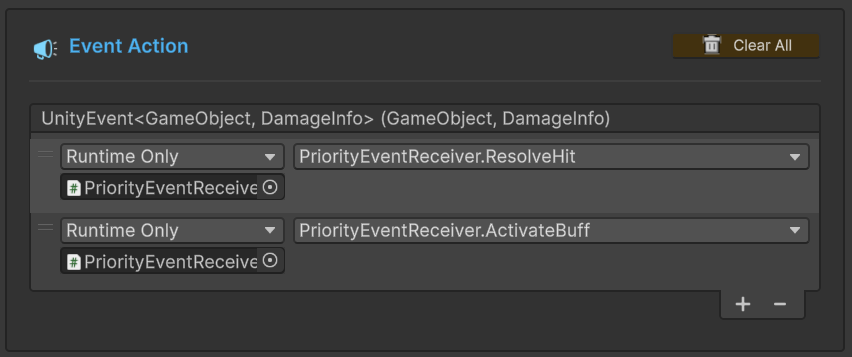
Execution Sequence:
ResolveHit(Top position - executes first)ActivateBuff(Bottom position - executes second)
Result: Damage calculated before buff applied = Normal Hit
✅ Correct Order (OnOrderedHit)
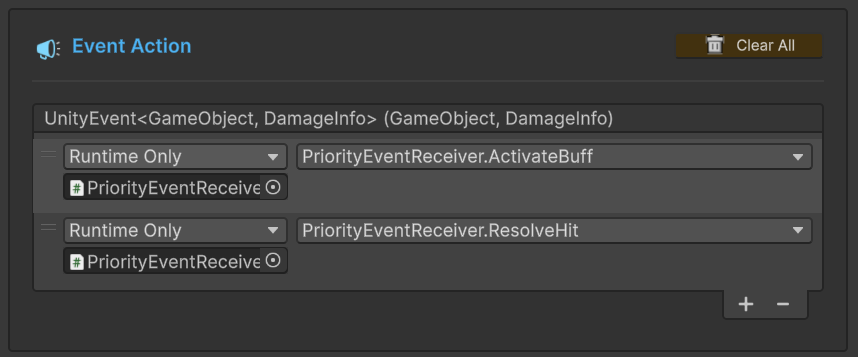
Execution Sequence:
ActivateBuff(Top position - executes first)ResolveHit(Bottom position - executes second)
Result: Buff applied before damage calculated = Critical Hit
You can change the execution order by dragging the handle (≡) on the left side of each listener in the Behavior Window. This is a visual, no-code way to modify gameplay logic!
Sender Setup (PriorityEventRaiser)
Select the PriorityEventRaiser GameObject in the Hierarchy:
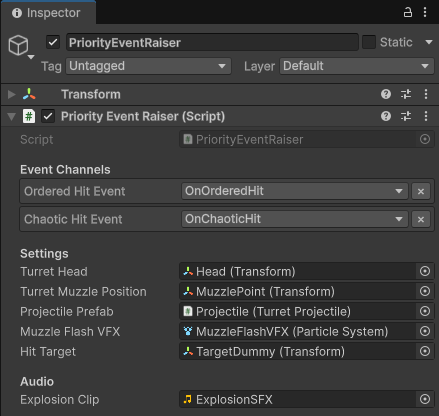
Event Channels:
Ordered Hit Event:OnOrderedHit(configured correctly)- Tooltip: "Apply Buff → Then Fire"
Chaotic Hit Event:OnChaoticHit(configured incorrectly)- Tooltip: "Fire → Then Apply Buff (Too late!)"
Settings:
Turret Head: SentryTurret/Head (Transform for aiming)Turret Muzzle Position: Head/MuzzlePoint (projectile spawn)Projectile Prefab: Projectile visual effectMuzzle Flash VFX: Particle system for firingHit Target: TargetDummy (Transform)
Receiver Setup (PriorityEventReceiver)
Select the PriorityEventReceiver GameObject in the Hierarchy:
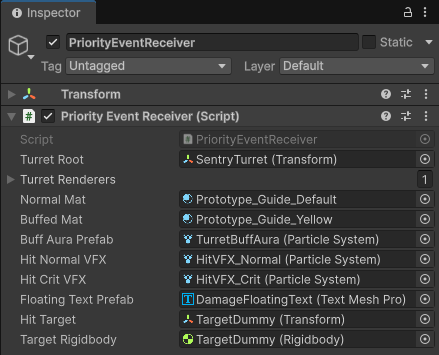
Visual Configuration:
Turret Root: SentryTurret (Transform)Turret Renderers: Array of 1 renderer (the turret body)Normal Mat: Grey material (default state)Buffed Mat: Gold material (buffed state)Buff Aura Prefab: Cyan particle effect for buff visualization
VFX Configuration:
Hit Normal VFX: Small smoke particle systemHit Crit VFX: Large explosion particle systemFloating Text Prefab: Damage number display
Target References:
Hit Target: TargetDummy (Transform)Target Rigidbody: TargetDummy (Rigidbody for knockback)
💻 Code Breakdown
📤 PriorityEventRaiser.cs (Sender)
using UnityEngine;
using TinyGiants.GameEventSystem.Runtime;

public class PriorityEventRaiser : MonoBehaviour
{
    [Header("Event Channels")]
    [Tooltip("Configured in Editor: Apply Buff -> Then Fire.")]
    [GameEventDropdown] public GameEvent<GameObject, DamageInfo> orderedHitEvent;

    [Tooltip("Configured in Editor: Fire -> Then Apply Buff (Too late!).")]
    [GameEventDropdown] public GameEvent<GameObject, DamageInfo> chaoticHitEvent;

    private GameEvent<GameObject, DamageInfo> _pendingEvent;

    /// <summary>
    /// Button A: Starts attack sequence that triggers the "Ordered" event.
    /// </summary>
    public void FireOrderedSequence()
    {
        if (orderedHitEvent == null) return;
        _pendingEvent = orderedHitEvent;
        _isAttacking = true;
        Debug.Log("[Sender] Initiating ORDERED attack sequence...");
    }

    /// <summary>
    /// Button B: Starts attack sequence that triggers the "Chaotic" event.
    /// </summary>
    public void FireChaoticSequence()
    {
        if (chaoticHitEvent == null) return;
        _pendingEvent = chaoticHitEvent;
        _isAttacking = true;
        Debug.Log("[Sender] Initiating CHAOTIC attack sequence...");
    }

    private void FireProjectile()
    {
        // ... Projectile creation logic ...

        shell.Initialize(hitTarget.position, 15f, () =>
        {
            DamageInfo info = new DamageInfo(10f, false, DamageType.Physical,
                                            hitTarget.position, "Sentry Turret");

            // Raise whichever event was queued (Ordered or Chaotic)
            if(_pendingEvent != null)
                _pendingEvent.Raise(this.gameObject, info);

            Debug.Log($"[Sender] Impact! Event '{_pendingEvent?.name}' Raised.");
        });
    }
}
Key Points:
- 🎯 Same Sender Code - Both events use identical raise logic
- 📦 Event Selection -
_pendingEventdetermines which event fires - 🔇 Order Agnostic - Sender has no knowledge of listener order
📥 PriorityEventReceiver.cs (Listener)
using UnityEngine;
using System.Collections;

public class PriorityEventReceiver : MonoBehaviour
{
    [SerializeField] private Renderer[] turretRenderers;
    [SerializeField] private Material buffedMat;
    [SerializeField] private ParticleSystem buffAuraPrefab;

    private bool _isBuffActive; // The critical state flag

    /// <summary>
    /// [Listener Method A]
    /// Activates the buff state and visual effects.
    ///
    /// PRIORITY IMPACT:
    /// - If configured ABOVE ResolveHit: Buff applies BEFORE damage calculation → CRITICAL HIT
    /// - If configured BELOW ResolveHit: Buff applies AFTER damage calculation → NORMAL HIT
    /// </summary>
    public void ActivateBuff(GameObject sender, DamageInfo args)
    {
        _isBuffActive = true; // <-- THE CRITICAL STATE CHANGE

        // Visual feedback: Gold material + particle aura
        foreach (var r in turretRenderers)
            if(r) r.material = buffedMat;

        if (buffAuraPrefab != null)
        {
            _activeBuffEffect = Instantiate(buffAuraPrefab, turretRoot.position,
                                           Quaternion.identity);
            _activeBuffEffect.transform.SetParent(turretRoot);
            _activeBuffEffect.Play();
        }

        Debug.Log("<color=cyan>[Receiver] (A) BUFF ACTIVATED! " +
                  "Systems at 300% power.</color>");
    }

    /// <summary>
    /// [Listener Method B]
    /// Calculates damage and spawns VFX based on CURRENT buff state.
    ///
    /// LOGIC: Checks _isBuffActive at the EXACT MOMENT of execution.
    /// For correct behavior, ActivateBuff must execute BEFORE this method.
    /// </summary>
    public void ResolveHit(GameObject sender, DamageInfo args)
    {
        float finalDamage = args.amount;
        bool isCrit = false;
        ParticleSystem vfxToPlay;

        // Check the flag at THIS EXACT MOMENT
        if (_isBuffActive)
        {
            // CRITICAL PATH
            finalDamage *= 5f; // 5x damage multiplier
            isCrit = true;
            vfxToPlay = hitCritVFX;

            StartCoroutine(ShakeCameraRoutine(0.2f, 0.4f));
            Debug.Log("<color=green>[Receiver] (B) RESOLVE: Buff detected! " +
                      "CRITICAL EXPLOSION.</color>");
        }
        else
        {
            // NORMAL PATH
            vfxToPlay = hitNormalVFX;
            Debug.Log("<color=red>[Receiver] (B) RESOLVE: No buff detected. " +
                      "Weak hit. (Check Priority Order!)</color>");
        }

        // Spawn appropriate VFX
        if (vfxToPlay != null)
        {
            var vfx = Instantiate(vfxToPlay, args.hitPoint, Quaternion.identity);
            vfx.Play();
            Destroy(vfx.gameObject, 2.0f);
        }

        // Apply physics and UI feedback
        ApplyPhysicsKnockback(args, isCrit);
        ShowFloatingText(finalDamage, isCrit, hitTarget.position);

        StartCoroutine(ResetRoutine());
    }

    private IEnumerator ResetRoutine()
    {
        yield return new WaitForSeconds(1.5f);
        _isBuffActive = false; // Reset for next attack
        // ... Reset visuals ...
    }
}
Key Points:
- 🎯 State Dependency -
ResolveHitbehavior depends entirely on_isBuffActiveflag - ⏱️ Timing Critical - The flag must be set BEFORE damage calculation
- 🔀 Order-Dependent Logic - Same code, different results based on execution order
- 🎨 Visual Feedback - Different VFX, text size, and effects for each path
🔑 Key Takeaways
| Concept | Implementation |
|---|---|
| 🎯 Execution Order | Listener order directly affects gameplay logic |
| 🎨 Visual Configuration | Drag-and-drop in Behavior Window—no code changes |
| 🔀 State Management | Order matters when listeners modify shared state |
| 🐛 Debug Pattern | Console logs help identify order-related bugs |
| 🔄 Gameplay Design | Enable/disable order controls combo systems, buff stacking, etc. |
Execution order is critical for:
- Buff systems - Apply modifiers before calculating effects
- Combo chains - Validate conditions before triggering next action
- Shield mechanics - Check absorption before applying damage
- Trigger sequences - Ensure prerequisites are met before executing dependent logic
Always test both orders to ensure your logic works as intended!
🎯 What's Next?
You've mastered execution order. Now let's explore conditional event triggering to make events smarter.
Next Chapter: Learn about conditional logic in 06 Conditional Event
📚 Related Documentation
- Game Event Behavior - Detailed guide to listener configuration
- Best Practices - Patterns for order-dependent logic
- Listening Strategies - Advanced callback patterns